Introduction
If you have searched your name online and discovered your address, phone number, age, relatives, or other personal details on a people-search website, you may understandably want that information removed. How to Remove Your Information from Nuwber is a common privacy question because people-search databases can make personal information easier for strangers to find.
Nuwber is one of several people-search and data-broker websites that can display information associated with individuals. Current third-party opt-out guides describe a process involving your Nuwber profile URL and email verification. RedactZero
The important point is that removing a profile from Nuwber is only one part of managing your digital footprint. Your information may also appear on other people-search sites, directories, social platforms, or search engines.
This guide explains the Nuwber removal process, what to do after submitting an opt-out, common mistakes to avoid, and how professional reputation and privacy support can help when the problem extends across multiple websites.
What Is Nuwber?
Nuwber is a people-search website that aggregates information associated with individuals and makes it searchable online.
Depending on the available data, a people-search profile can contain information such as:
- Full name
- Previous names or aliases
- Current or previous addresses
- Phone numbers
- Email information
- Age-related information
- Relatives or associates
- Property-related information
- Other publicly available or commercially sourced information
The exact information displayed can vary from one person to another.
This broader data-broker ecosystem matters because personal information can exist across multiple databases at the same time. Forbes has discussed how data brokers aggregate information to create detailed digital profiles and why individuals and organizations should pay attention to how personal information is collected and shared. Forbes
So, removing one listing is useful, but it should not be mistaken for removing your entire digital footprint.
How to Remove Your Information from Nuwber
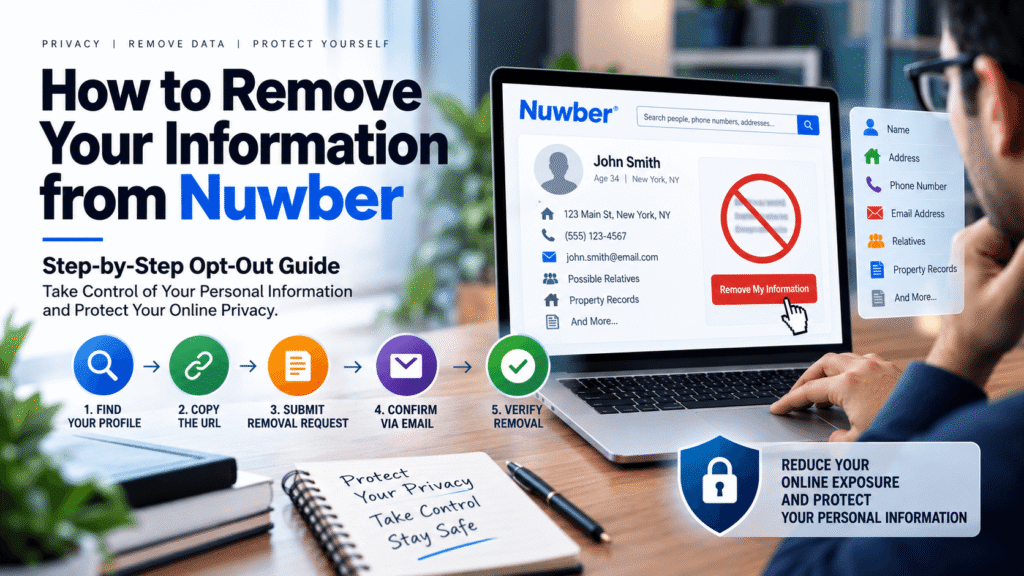
The current Nuwber opt-out process generally requires you to locate your listing, copy its profile URL, submit that URL through Nuwber’s removal process, and confirm your request by email. Norton documents the same basic sequence: search for the profile, copy the URL, submit it through Nuwber’s removal mechanism, provide an email address, and confirm the request through email. Norton Support
Here is the practical process.
Step 1: Search for Your Nuwber Profile
Go to Nuwber and search for your:
- First and last name
- City
- State
Adding your location can help narrow down matching profiles.
Be careful when identifying the correct listing. People with common names may have multiple similar profiles.
Check the Details Carefully
Before submitting an opt-out request, compare the listing against information you know is yours.
Look for:
- Current or previous addresses
- Phone numbers
- Relatives
- Age information
- Other identifying details
Do not assume that the first matching name is automatically your profile.
Step 2: Open the Correct Profile
Once you find the listing that belongs to you, open the profile.
The opt-out process requires the profile URL according to current guides, so copy the complete URL from your browser address bar. RedactZero
Why the URL Matters
A people-search website may contain several records for individuals with similar names.
The profile URL helps identify the specific listing you want addressed.
Save a copy of the URL before continuing.
Step 3: Go to Nuwber’s Removal Page
Current opt-out guides identify Nuwber’s removal page as:
You may also be able to reach the removal option through Nuwber’s website interface.
Because websites can change their navigation, check Nuwber’s current privacy or removal instructions if the direct page does not work.
Step 4: Submit Your Profile URL
Paste the Nuwber profile URL into the appropriate field.
Current instructions documented by Norton indicate that the next step involves entering an email address and submitting the removal request. Norton Support
Use an email address that you can access because you will need it to complete the verification process.
Privacy Tip
Before submitting any information, make sure you are using Nuwber’s actual website.
Be cautious with third-party websites that ask for unnecessary sensitive information or payment to perform a basic opt-out that the provider itself makes available.
Step 5: Confirm the Request by Email
After submitting the request, check your inbox.
Also check:
- Spam
- Junk
- Promotions
- Other filtered folders
Current instructions indicate that Nuwber sends a confirmation email and that you need to follow the confirmation process to complete the opt-out. Norton Support
Do not assume that submitting the first form means the process is complete.
Email confirmation is an important part of the workflow.
Step 6: Save Your Confirmation
Keep a record of:
- Nuwber profile URL
- Date of submission
- Email used
- Confirmation email
- Any reference or confirmation information
- Screenshots, if appropriate
This creates a simple record of what you requested.
If the listing later reappears, having documentation can make follow-up easier.
Step 7: Verify the Removal
After the request has been processed, search Nuwber again.
Search using:
Your full name + city + state
Then check whether the original profile remains accessible.
Do not stop at the first search.
If you have multiple name variations or more than one profile, check those separately.
What Information May Appear on a Nuwber Profile?
People-search websites can aggregate information from different sources, so profiles can vary.
Depending on the individual and available data, you may encounter:
| Information Type | Examples |
|---|---|
| Identity | Name, aliases |
| Location | Current or previous addresses |
| Contact | Phone numbers, email information |
| Demographics | Age-related information |
| Relationships | Relatives or associates |
| Property | Property-related records |
| Online Presence | Certain publicly available profiles or references |
The exact data available should not be assumed for every person.
That distinction matters because a privacy strategy should be based on what is actually exposed—not on assumptions about what a particular data broker stores.
What Happens After You Submit an Opt-Out?
Removing a profile from Nuwber and removing information from the wider internet are two different things.
A successful Nuwber opt-out addresses the Nuwber listing.
It does not automatically remove copies of the same information from:
- Bing
- Other people-search websites
- Public directories
- Social media
- Other data brokers
- Archived pages
- Third-party websites
Google explicitly explains that removing a result from Google Search does not necessarily remove the information from the source website. To remove information from the source, you generally need to contact the website owner. Google Help
This is one of the most important concepts in online privacy management.
Source Removal vs. Search Removal
Think of your information as existing in two layers.
Layer 1: The source website
This is where the information is actually published or stored.
Layer 2: Search engines
Google or Bing may index and display a link to that source.
Removing a search result is not necessarily the same as deleting the underlying page.
Nuwber vs. Google Search Removal
These processes solve different problems.
| Action | What It Addresses |
|---|---|
| Nuwber opt-out | Your Nuwber profile |
| Website owner removal | Information on the source website |
| Google removal request | Eligible content from Google Search |
| Bing removal process | Eligible content from Bing |
| Broader privacy management | Multiple websites and data sources |
Google’s Results About You feature allows eligible users to monitor for certain personal information in Google Search and request removal of qualifying results. Google says this can include information such as a home address, phone number, and email address, subject to its policies and public-interest considerations. Google Help
Google also makes clear that an approved Search removal does not automatically erase the underlying webpage. Google Help
Microsoft similarly explains that Bing limits search-result removal to specific circumstances and that removing a result from Bing does not necessarily remove the information from the original website. Microsoft Support
How to Protect Your Digital Footprint After Opting Out
Removing one profile is a useful first step.
However, your broader digital footprint deserves attention too.
1. Search Your Name Regularly
Search:
- Your full name
- Name + city
- Name + state
- Name + phone number
- Name + business
- Common spelling variations
Google itself recommends searching for yourself as part of managing your online reputation. Google Help
For ongoing monitoring, you can also use a structured Reputation Monitoring strategy.
2. Check Other People-Search Websites
Nuwber is not the only platform that may contain your information.
Your information may appear across several people-search services.
For example, you can review these related guides:
- How to Remove Your Information from FastPeopleSearch: Complete Opt-Out Guide
- How to Remove Your Information from USSearch: Complete Opt-Out Guide
- How to Remove Your Information from Intelius: Complete Opt-Out Guide
- How to Remove Your Information from PeopleFinders
- The Anatomy of a People-Search Listing and How to Fix It
- How TruthFinder and People Search Sites Aggregate Data: What You Need to Know
Each service can have its own process, so do not assume that opting out from one site automatically covers every other database.
3. Understand the Broader People-Search Ecosystem
People-search listings often exist within a much larger network of public and commercial information.
Our guide to The Hidden Risk of People Search Sites Like Spokeo and Whitepages explains why exposure across multiple platforms can become a broader privacy and reputation issue.
You can also read The Truth About People Search Websites for a broader overview of how these platforms affect personal information online.
Real Example: Removing a Nuwber Listing
Consider a fictional professional named Daniel.
Daniel searches his name and discovers a Nuwber profile containing:
- His full name
- An old address
- A previous phone number
- Information about possible relatives
He wants to reduce his exposure.
What Daniel Does
First, he confirms that the profile actually belongs to him.
Second, he copies the profile URL.
Third, he uses Nuwber’s current removal process.
Fourth, he submits his email address.
Fifth, he confirms the request through email.
Sixth, he saves the confirmation.
Finally, he checks Nuwber again after the request has been processed.
But Daniel does not stop there.
He searches Google and discovers that similar information appears on two other websites.
That changes the situation.
Daniel now has a broader digital-footprint issue rather than a single Nuwber listing.
This is why effective privacy management requires looking beyond one website.
Common Mistakes When Removing Your Information from Nuwber
Mistake 1: Choosing the Wrong Profile
Common names can create multiple matches.
Always compare the available information before submitting an opt-out.
Mistake 2: Forgetting Email Verification
Submitting a form is not necessarily the final step.
Check your email and complete the confirmation process.
Mistake 3: Assuming One Opt-Out Removes Everything
Nuwber removal does not automatically remove your information from every other data broker.
Mistake 4: Ignoring Duplicate Listings
If you discover multiple profiles that belong to you, document each one and determine whether a separate request is required.
Mistake 5: Forgetting Search Engines
Your profile might disappear from Nuwber while related information continues to appear elsewhere.
Mistake 6: Paying an Unnecessary Third Party
Check whether the data broker provides a free, direct opt-out before paying a company to perform a basic request.
Mistake 7: Not Keeping Records
Save your confirmation emails and request details.
Documentation becomes useful if you need to follow up later.
Best Practices for Personal Information Removal
Create a Removal Checklist
Keep a simple spreadsheet containing:
- Website
- Profile URL
- Date found
- Date requested
- Confirmation status
- Verification date
- Follow-up date
- Current status
This prevents you from losing track of multiple requests.
Check Your Name Periodically
Your digital footprint can change.
New information may appear even after you have completed previous opt-outs.
Use Consistent Identity Details
When checking different platforms, search variations of your name, previous locations, and other relevant identifiers.
Protect Information You Control
Review privacy settings on:
- Social media
- Professional directories
- Personal websites
- Old accounts
- Public profiles
If you control the source, changing or deleting the information there can sometimes be more effective than dealing with the search engine afterward.
Monitor Search Results
If personal information is appearing prominently in Google, Google’s removal tools may provide another avenue when the content qualifies under its policies. Google Help
Expert Tips for Managing People-Search Exposure
Think in Systems, Not Individual Websites
Removing information from one website can feel like a complete solution.
It usually isn’t.
Think about your online presence as an ecosystem involving:
Data brokers → Search engines → Social platforms → Directories → Public records → Third-party websites
Your objective is to understand where information originates and where it is being redistributed.
Prioritize High-Risk Information
Not every piece of information carries the same privacy implications.
Pay particular attention to:
- Home addresses
- Personal phone numbers
- Personal email addresses
- Sensitive identifiers
- Information that could facilitate harassment
- Information that creates security concerns
Google specifically provides removal mechanisms for certain personal information and doxxing situations, subject to its policies. Google Help
Monitor Brand and Personal Reputation Separately
If you are a CEO, business owner, doctor, lawyer, Realtor, consultant, or public-facing professional, your personal search results can also affect your professional reputation.
For example, someone may search:
“John Smith attorney”
rather than simply:
“John Smith”
That means privacy protection and reputation management can overlap.
When Should You Consider Professional Help?
A straightforward Nuwber opt-out may be manageable on your own.
However, the situation can become more complicated when information appears across many websites.
Professional support may be useful when:
- You have numerous people-search listings.
- Your personal information appears across multiple data brokers.
- Negative or misleading content ranks prominently in Google.
- You have an ongoing privacy concern.
- Your personal and professional identities are strongly connected.
- You are a public-facing executive or business owner.
- You need ongoing monitoring.
- You do not have time to manage multiple removal requests.
YourReputation.agency can help evaluate the broader digital footprint rather than treating one website in isolation.
Our Remove Personal Information from Data service focuses on the broader challenge of reducing personal-information exposure across relevant online sources.
For a wider reputation strategy, our Personal Reputation Management service can address the connection between your personal identity, search presence, and professional reputation.
And when the issue involves a larger public reputation problem, Online Reputation Protection Services can provide a broader, proactive approach.
How Reputation Management Fits Into Privacy Protection
Privacy removal and ORM are related, but they are not identical.
Privacy removal focuses on reducing exposure of personal information.
Reputation management focuses on how you or your organization are represented and perceived online.
A person may need both.
For example, removing an old address from a people-search website may improve privacy, while improving inaccurate search results may require a different strategy.
HubSpot describes reputation management as an ongoing process involving review sites, social media, news, SEO, and other online channels. HubSpot Blog
Modern reputation monitoring also extends into AI-generated answers. HubSpot’s current AEO documentation explains that organizations can track how brands appear across answer engines such as ChatGPT, Gemini, and Perplexity, including the sources used in those responses. HubSpot Knowledge Base
That means your long-term strategy should consider both privacy exposure and reputation visibility.
What If Nuwber Information Appears in Google?
Suppose you complete a Nuwber opt-out but Google still shows a Nuwber result.
Do not immediately assume that the opt-out failed.
Search engines can take time to update their indexes.
First:
- Check whether the Nuwber profile itself is still accessible.
- Confirm whether the information has actually disappeared from the source.
- If the source page has changed or disappeared, investigate Google’s outdated-content options.
- If the result contains qualifying personal information, review Google’s removal options.
Google states that if a website has already removed information, users can use its outdated-content mechanisms to request that Search reflect the change. Google Help
The distinction between source removal and search-result removal is critical.
How to Protect Your Brand Name After Removing Personal Information
Privacy and reputation often intersect.
If you are a business owner, executive, doctor, lawyer, real estate professional, or personal-brand entrepreneur, search results for your name may influence professional opportunities.
After handling privacy exposure, consider auditing your broader branded search presence.
Our guide, How to Protect Your Brand Name in Google Search, explains how to build a stronger search presence through monitoring, accurate information, authoritative content, and reputation-focused SEO.
You may also find How to Monitor Your Name on Google Automatically useful for establishing a recurring monitoring routine.
The goal is not to manipulate search results.
Google’s guidance emphasizes helpful, reliable, people-first content and warns against creating content primarily to manipulate rankings. Google for Developers
That same principle applies to reputation management: build useful, accurate, trustworthy digital assets rather than relying on shortcuts.
Why Search Visibility Matters After Data Removal
Removing personal information is only one side of digital reputation protection.
The other side is ensuring that the information you want people to find is accurate, useful, and easy to discover.
For example, a professional might want searchers to find:
- Official website
- Professional biography
- Company profile
- Industry credentials
- Published articles
- Professional social profiles
- Relevant media coverage
- Business contact information
Google’s current guidance for AI search also emphasizes unique, valuable, people-first content rather than creating large quantities of pages simply to capture search traffic. Google for Developers
That makes quality especially important when building a long-term reputation strategy.
Search Engine Journal has also discussed the role of creating and strengthening positive, authoritative content when dealing with negative search results. Search Engine Journal
Additional Resources for Managing Your Online Presence
If you are dealing with people-search websites or broader online reputation concerns, these resources may be useful:
- How to Remove Your Information from FastPeopleSearch: Complete Opt-Out Guide
- How to Remove Your Information from USSearch: Complete Opt-Out Guide
- How to Remove Your Information from Intelius: Complete Opt-Out Guide
- How to Remove Your Information from PeopleFinders
- The Anatomy of a People-Search Listing and How to Fix It
- How TruthFinder and People Search Sites Aggregate Data: What You Need to Know
- The Hidden Risk of People Search Sites Like Spokeo and Whitepages
- The Truth About People Search Websites
- Removing Name From Radaris: 7 Brutal Steps to Reclaim Privacy
Common Questions About Nuwber Removal
1. How to Remove Your Information from Nuwber?
To Remove Your Information from Nuwber, first locate your matching Nuwber profile, copy its URL, use Nuwber’s current removal process, submit your email address, and confirm the request through email. Then verify that the profile is no longer publicly accessible.
2. Is Nuwber removal free?
Current third-party opt-out documentation describes Nuwber’s direct opt-out process as free. RedactZero
Always use the provider’s own website and verify its current terms and process.
3. What do I need to remove my Nuwber listing?
The current process generally requires the URL of the Nuwber profile and an email address for verification. Norton Support
4. How long does Nuwber take to remove information?
Current third-party guides report different processing windows, commonly around 24–48 hours after email confirmation, although actual processing can vary. Delist.ai
Do not treat any third-party timeline as a guarantee.
5. Will removing my Nuwber profile remove my information from Google?
Not necessarily. Nuwber and Google are separate services. If Google has indexed a Nuwber page, the search result may require additional time or a separate Google process to update.
6. Can my information come back after I opt out?
It can. People-search databases may receive updated information from data sources, so periodic monitoring is sensible. Current independent guides specifically warn that listings can reappear after new data is ingested. RedactZero
7. Can I remove my information from Google too?
Google provides removal processes for certain types of personal information and other qualifying content. Its Results About You feature can help eligible users identify and request removal of certain personal information appearing in Search. Google Help
8. Does Google removal delete information from the internet?
No. Google explains that removing a result from Search does not necessarily remove the information from the original website. Source-level removal generally requires contacting the website owner or using the website’s own removal process. Google Help
9. Should I remove my information from every people-search website?
If your goal is to reduce your public data exposure, you may want to audit the major people-search and data-broker sites where your information appears. The appropriate scope depends on your privacy concerns, risk level, and available time.
10. Can YourReputation.agency help remove information from Nuwber?
YourReputation.agency can help assess your broader online exposure and develop a strategy for managing personal information and reputation risks. For a larger project, Contact Us to discuss your situation and the appropriate scope of work.
Featured Snippet Answer
How to Remove Your Information from Nuwber: Find your Nuwber profile, copy its URL, open Nuwber’s removal page, submit the profile URL and an email address, then confirm the request through email. Afterward, verify that the listing is no longer visible and check other people-search sites because removing one profile does not remove information everywhere.
Conclusion
Learning How to Remove Your Information from Nuwber is a practical first step if you want greater control over your personal information online.
The process is relatively straightforward: identify your listing, copy the correct profile URL, submit the removal request, confirm your email, and verify the result.
However, your privacy strategy should not end there.
Your information may exist on other people-search platforms, directories, social networks, and search engines. Google and Microsoft both make clear that search-result removal and source-level removal are different processes. Google Help
For that reason, think beyond one URL.
Audit your broader digital footprint. Monitor your name. Check other data brokers. Protect information you control. And, if your personal search presence affects your professional reputation, consider a broader ORM strategy.
For individuals and professionals who need ongoing support, YourReputation.agency can help connect privacy-focused information removal with a broader reputation management strategy.
Take Control of Your Online Reputation
Finding your personal information on Nuwber can be frustrating—but you do not have to manage your entire digital footprint alone.
YourReputation.agency helps individuals, executives, business owners, and personal brands identify online reputation risks and develop practical strategies for managing their digital presence.
If your situation goes beyond one Nuwber profile, our team can help you assess the wider landscape, identify important sources, monitor your name, and determine which reputation-management strategies may be appropriate.
Explore our Reputation Management services or learn more about our Reputation Management Agency approach.
For serious or fast-moving reputation situations, Crisis Reputation Management may also be relevant.
Ready to understand what is publicly visible about you? Contact Us for a professional assessment of your online reputation and personal information exposure.
You can also review independent customer feedback through Trustpilot.