Quick answer: remove your information from USSearch
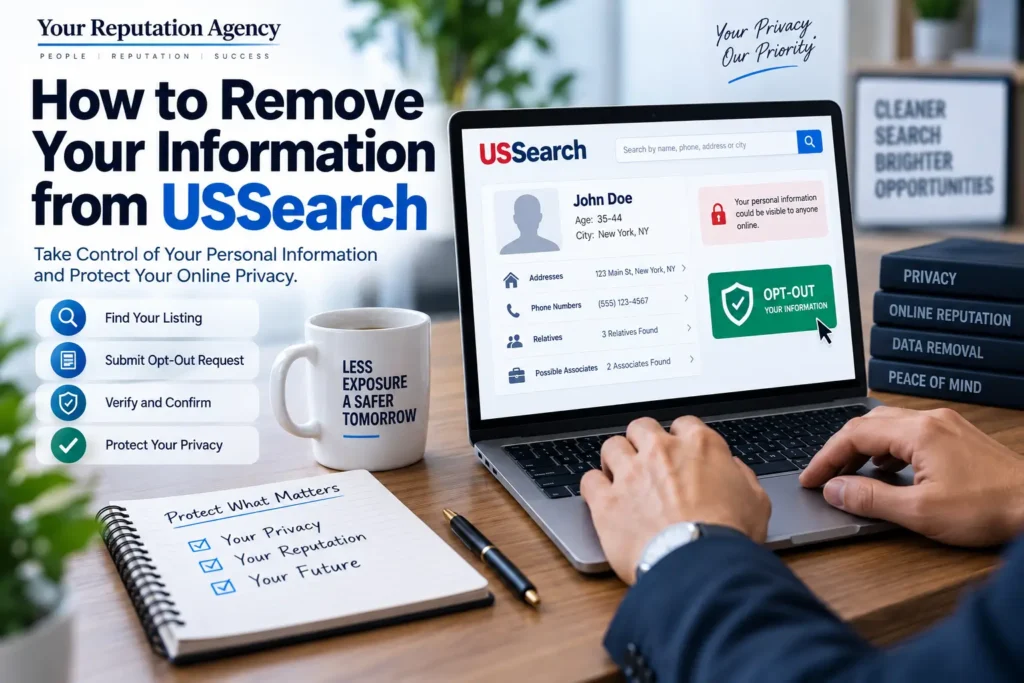
Remove your information from USSearch by finding the correct record, saving the listing URL, submitting the official opt-out request, and completing verification.
Confirm removal, request search refreshes after changes, correct inaccurate source records, and keep a removal log because profiles may return.
Introduction
If you have searched your name online and found your address, phone number, relatives, or other personal details on USSearch, you may be wondering How to Remove Your Information from USSearch.
USSearch is a people-search service that makes information about individuals searchable online. Its listings can contain personal details collected from public records and other sources. Although opting out can reduce your visibility on the platform, removing a listing from one people-search site does not necessarily remove the underlying information from the internet.
That distinction is important.
Your personal information may also appear on other data-broker and people-search websites. It can also remain on the original public-record source or continue appearing elsewhere after an opt-out.
In this guide, we explain how the USSearch opt-out process works, what information may appear in a listing, what to do after submitting your request, and how to protect your broader digital footprint.
At YourReputation.agency, we approach data removal as part of a larger privacy and online reputation strategy—not simply as a one-time form submission.
Table of Contents
- What Is USSearch?
- What Information Can USSearch Display?
- Why Remove Your Information from USSearch?
- How to Remove Your Information from USSearch
- What Happens After You Submit an Opt-Out?
- Does Removing USSearch Information Remove It From Google?
- What If Your Information Reappears?
- USSearch vs. Google Search Removal
- Real-World Example
- Common USSearch Removal Mistakes
- Best Practices for Protecting Your Digital Footprint
- When Professional Reputation Support Makes Sense
- Frequently Asked Questions
- Conclusion
- Strong CTA
What Is USSearch?
USSearch is a people-search service that allows users to search for information associated with individuals.
People-search websites can aggregate information from different sources and present it in a searchable profile.
Depending on the individual and available data, a listing may include information such as:
- Full name
- Age
- Current or previous addresses
- Phone numbers
- Relatives or associates
- Property-related information
- Employment information
- Other publicly available records
The exact information available can vary.
The California Department of Justice’s data-broker registration information identifies Intelius as the company associated with USSearch and explains that consumers can request an opt-out of having personal information appear on USSearch and related sites.
This is why it is useful to think about USSearch as part of a broader people-search and data-broker ecosystem rather than as an isolated website.
What Information Can USSearch Display?
A USSearch profile can be concerning because information that seems harmless individually can become much more revealing when combined.
For example, a listing might connect:
Your name → previous address → current address → relatives → phone number
Even if each piece of information originated from a public source, having the information consolidated into one searchable profile can make it considerably easier for strangers to discover.
This can create several concerns.
Privacy
You may not want your home address or phone number easily discoverable by anyone who searches your name.
Personal Safety
People in sensitive professions or situations may have stronger reasons to limit the public availability of their residential information.
Identity Protection
Personal information spread across multiple websites can increase the amount of information available for unwanted contact or social-engineering attempts.
Professional Reputation
For executives, business owners, doctors, lawyers, real estate professionals, and public-facing professionals, personal information can also become part of the broader search experience surrounding their name.
This is where privacy and reputation management can overlap.
Why Remove Your Information from USSearch?
There is no single reason everyone should opt out.
However, many people choose to reduce their exposure because they want greater control over their personal information.
Common reasons include:
- Reducing unwanted calls
- Limiting public exposure of home addresses
- Reducing unnecessary personal-data aggregation
- Protecting family privacy
- Managing professional visibility
- Reducing the amount of information available to strangers
- Cleaning up an outdated digital footprint
It is also important to understand what an opt-out does not accomplish.
Removing a USSearch profile does not automatically erase public records, remove information from every data broker, or delete every mention of your name from Google.
Google explains that removing a result from Google Search does not necessarily remove the information from the website hosting it. To remove information from the source itself, you generally need to contact the website owner.
That distinction is central to effective personal information removal.
How to Remove Your Information from USSearch
The exact interface can change over time, so always follow the current instructions presented by USSearch or its associated privacy/suppression system.
Current third-party guides report that USSearch’s opt-out process is connected to the PeopleConnect suppression system.
Step 1: Find Your USSearch Listing
Start by searching for your name on USSearch.
Use identifying information such as:
- Full name
- State
- City
- Previous locations, where relevant
Be careful if you have a common name.
You do not want to select another person’s profile simply because the name looks similar.
Compare available details such as:
- Age
- Location
- Previous locations
- Relatives
- Other identifying information
Step 2: Access the Current Suppression Process
USSearch’s opt-out process may route through the PeopleConnect suppression center.
A current reported entry point is: PeopleConnect Suppression Center
Because privacy pages and opt-out URLs can change, it is sensible to begin from the USSearch website or its current privacy/opt-out link if the direct suppression URL changes.
Step 3: Provide Your Email Address
The suppression process may require an email address for verification.
Use an email account that you can access because you may need to confirm your request before the process continues.
Step 4: Verify Your Identity
The current suppression flow may request additional information to help match your identity with the correct record.
Third-party documentation of the current process indicates that verification can involve information such as your name and date of birth, followed by an additional verification step.
Only provide information through the legitimate privacy/suppression process.
Step 5: Locate Your Record
Review the matching profiles carefully.
If multiple records appear, do not assume that every record belongs to you.
Look for matching:
- Name
- Age
- Location
- Relatives
- Address history
Step 6: Select the Correct Record
Once you identify your profile, follow the instructions to request suppression.
Read the confirmation carefully before submitting.
Step 7: Complete Email or Identity Verification
If the process sends you a verification email or code, complete that step.
An unverified request may not be processed.
Step 8: Save Your Confirmation
Keep:
- Confirmation emails
- Request dates
- Profile URLs
- Screenshots
- Any reference numbers
This documentation can become useful if the listing remains visible or later returns.
What Happens After You Submit an Opt-Out?
Do not assume that submitting a request means the entire internet has forgotten your information.
An opt-out generally addresses the particular service and record involved.
The California Attorney General’s data-broker information specifically describes an opt-out mechanism for USSearch and related properties.
However, information may continue to exist elsewhere.
For example:
USSearch → Other people-search sites → Public records → Search engines → Other websites
This is why privacy protection should be viewed as an ongoing process.
You should revisit your name periodically after completing the opt-out.
Does Removing USSearch Information Remove It From Google?
Not necessarily.
This is one of the most important distinctions to understand.
If USSearch has a page indexed by Google, removing your USSearch listing may eventually affect that search result.
However, Google does not control the original USSearch database.
Google explains that it can remove certain qualifying personal information from Search, but removal from Google Search does not necessarily remove the information from the source website.
Google also provides a Results about you feature that can help users find personal contact information appearing in Search and, where eligible, request removal.
So think about the process in two layers:
Layer 1 — Source Removal
Try to remove or suppress the information from USSearch or the website hosting it.
Layer 2 — Search Visibility
If eligible, address the corresponding Google Search result separately.
These are related but different processes.
USSearch Removal vs. Google Search Removal
| Issue | USSearch Opt-Out | Google Search Removal |
|---|---|---|
| Primary purpose | Suppress information from USSearch | Remove eligible results from Google |
| Target | USSearch listing | Google Search result |
| Removes source content? | Addresses the USSearch listing | Usually does not remove source-page content |
| Other websites affected? | Not automatically | Not automatically |
| Requires verification? | May require identity verification | Depends on removal process |
| Ongoing monitoring useful? | Yes | Yes |
Google’s policies also distinguish between content removal from Search and removal from the website that originally published the information.
What If Your Information Reappears?
This is a common concern with data-broker removal.
Information can change, new records can be created, and data providers can update their databases.
That means one successful opt-out should not necessarily be treated as permanent protection.
Create a Recurring Check
Search for:
- Your full name
- Your name + city
- Your name + state
- Your phone number
- Your email address
- Your old addresses
Also check major people-search websites.
This is where Reputation Monitoring can become useful as part of a broader digital reputation strategy.
Rather than discovering a problem months later, ongoing monitoring gives you an opportunity to identify new visibility issues earlier.
Real Example: Removing a Public Profile
Imagine a real estate professional named Daniel discovers that a USSearch listing contains:
- His full name
- An old home address
- A previous address
- Relatives
- An outdated phone number
Daniel submits a USSearch suppression request.
The profile is subsequently suppressed.
However, when he searches his name a few weeks later, he discovers another people-search website showing the old address.
This does not necessarily mean the original USSearch request failed.
It means the information exists in more than one place.
Daniel therefore needs a broader digital-footprint strategy:
- Confirm the USSearch listing is suppressed.
- Identify other people-search sites displaying the information.
- Submit appropriate opt-out requests.
- Check Google for indexed personal information.
- Monitor whether the information returns.
- Review his broader professional search presence.
For people who need a wider approach, YourReputation.agency’s Remove Personal Information from Data service provides a natural next step beyond handling a single website.
Common Mistakes When Removing Information from USSearch
Mistake 1: Assuming One Opt-Out Removes Everything
A USSearch opt-out does not automatically remove every copy of your information from the web.
Mistake 2: Selecting the Wrong Profile
Common names can produce multiple records.
Always verify that the profile actually belongs to you.
Mistake 3: Ignoring Other Data Brokers
Your information may appear on several people-search services.
Removing one profile is only one part of the process.
Mistake 4: Forgetting Google
Even after a source page changes, Google may temporarily continue showing an indexed result.
Google provides specific tools for eligible personal-information and outdated-result situations.
Mistake 5: Not Saving Confirmation
Keep evidence of your opt-out request.
It makes future follow-up easier.
Mistake 6: Never Checking Again
Your information can reappear.
Periodic monitoring is therefore important.
Mistake 7: Treating Privacy and Reputation as Exactly the Same
Removing your address is primarily a privacy issue.
Removing a damaging article about your professional history is a different reputation-management problem.
The appropriate strategy depends on the content and its source.
Best Practices for Protecting Your Digital Footprint
A stronger privacy strategy goes beyond USSearch.
1. Audit Your Name
Search your name regularly and document what appears.
2. Identify Data-Broker Profiles
Look for people-search sites that publish your personal information.
3. Use Official Opt-Out Processes
Whenever possible, submit requests directly through the relevant platform.
4. Monitor Search Engines
Check Google and other search engines for new results involving your personal information.
5. Keep Professional Information Consistent
Make sure your official website, social profiles, business listings, and professional pages contain accurate information.
6. Strengthen Your Own Search Assets
For business owners and professionals, authoritative content about your work can help create a more complete online presence.
7. Monitor Your Reputation
Privacy issues and reputation issues can overlap.
A consistent Online Reputation Protection Services strategy can help businesses and professionals monitor broader digital risks rather than focusing on one website.
8. Protect Your Local Presence
Small businesses and local professionals should also maintain accurate business profiles and search information. Our guide to Online Presence & Local SEO for Small Businesses explains how local visibility and digital credibility work together.
People-Search Sites Are Only One Part of Your Digital Reputation
Removing personal information from USSearch is useful, but your online reputation extends much further.
Someone researching you may also encounter:
- News articles
- Reviews
- Business directories
- Professional profiles
- Blog posts
- Forum discussions
- Public records
- Personal websites
- Other data brokers
HubSpot’s current brand-monitoring guidance highlights how mentions now appear across websites, social media, reviews, forums, media, and AI-generated answers.
That means modern reputation management requires a broader view.
If someone searches your name today, what story does the entire search landscape tell?
That question matters for professionals, executives, founders, and business owners.
For a broader perspective, read:
How to Protect Your Brand Name in Google Search
When Professional Reputation Support Makes Sense
A basic USSearch opt-out can be manageable for someone who only wants to suppress one personal listing.
However, professional assistance may make sense when the problem is broader.
For example:
- Your information appears across many data-broker sites.
- Your name produces sensitive search results.
- You are a public-facing executive.
- You own a high-profile business.
- Negative information appears prominently in Google.
- You are dealing with a reputation crisis.
- You need ongoing monitoring.
- You want to protect both your personal and professional identity.
YourReputation.agency can help evaluate the larger digital environment rather than treating one search result as the entire problem.
For organizations and individuals with more complex exposure, our Reputation Management Services can support a broader reputation strategy.
USSearch, Privacy, Google, and the Modern Search Environment
Search engines are not simply directories anymore.
Google can surface websites, reviews, news, social content, maps, images, videos, and other information in response to a person’s name.
AI-powered systems are also changing how people discover information.
HubSpot notes that brand mentions increasingly appear within AI-generated answers from systems such as ChatGPT, Gemini, and Perplexity.
Forbes contributors have similarly discussed the shift toward AI-powered search and the growing importance of understanding the broader digital record surrounding a person or organization.
This does not mean you can completely control what an AI system says about you.
Instead, it means maintaining accurate, consistent, credible information across the public web has become increasingly important.
Expert Tips for Personal Information Removal
Tip 1: Start With the Source
If your information appears on a website, investigate whether the website offers a direct removal or suppression process.
Tip 2: Keep a Removal Spreadsheet
Track:
| Website | Information | Request Date | Status | Recheck Date |
|---|---|---|---|---|
| USSearch | Address/profile | Submitted | Pending/Removed | Future date |
| Data Broker 2 | Phone number | Submitted | Pending | Future date |
| Data Broker 3 | Address | Submitted | Removed | Future date |
This prevents you from losing track of multiple requests.
Tip 3: Search Multiple Variations
Use your:
- Full name
- Middle name
- Initials
- Previous surname
- Previous cities
- Phone number
- Email address
Tip 4: Separate Privacy From Reputation
A personal-data listing and a negative article require different approaches.
Do not use the same strategy for every problem.
Tip 5: Monitor After Removal
Removal is not necessarily the end.
Check periodically to determine whether the listing or similar information has returned.
Tip 6: Don’t Pay Before Understanding the Problem
Many basic opt-out processes are available directly through the relevant service.
Understand what is being offered before paying a third party for assistance.
Frequently Asked Questions
1. How to Remove Your Information from USSearch?
To remove your information from USSearch, locate the profile that belongs to you, use the current USSearch/PeopleConnect suppression process, complete the required verification, select the correct record, and submit the suppression request. Keep confirmation details and check again later to verify that the listing remains suppressed.
2. Is USSearch opt-out free?
Current opt-out guides report that the USSearch/PeopleConnect suppression process is free. Always use the current official privacy or suppression process rather than paying a third party simply to submit a basic request.
3. How long does it take to remove information from USSearch?
Processing times can vary and may change as the service updates its systems. Some current third-party guides report removal within several days to a few weeks. Treat those estimates as practical guidance rather than a guaranteed deadline. Keep your confirmation and verify the listing afterward.
4. Will removing my USSearch profile remove my information from Google?
Not necessarily. Removing a USSearch listing and removing a Google Search result are separate processes. Google explains that removing a result from Search does not necessarily remove the information from the original website.
5. Can my information come back after I opt out of USSearch?
It can. Data brokers may update their records from different sources, so it is sensible to monitor your information periodically after completing an opt-out.
6. Does USSearch have information about everyone?
Not necessarily. The information available varies between individuals and depends on the data sources available to the service. You should search for your own name to determine whether a relevant listing exists.
7. Can I remove my address from USSearch?
If your address appears in an eligible USSearch profile, you can use the applicable suppression process to request removal of that listing. However, removing a listing from USSearch does not necessarily remove the address from public records or other websites.
8. Can Google remove my home address from Search?
Google provides a process for requesting removal of certain private personal information, including addresses, phone numbers, and email addresses, from Google Search. Eligibility and Google’s public-interest considerations apply.
9. What if my information appears on multiple people-search websites?
You may need to submit separate opt-out requests to different services unless they share a centralized suppression process. A broader data-removal audit can help identify where your information is publicly exposed.
10. How often should I check my name after removing information?
There is no universal schedule, but periodic checks are useful. People with higher public visibility or greater privacy concerns may want to monitor more frequently.
11. Does removing information from USSearch protect my online reputation?
It can reduce one source of publicly accessible personal information, but it does not address every aspect of online reputation. Reviews, news articles, social media, professional profiles, and other search results may still influence how people perceive you.
12. What should I do if negative information appears when I Google my name?
First, identify the source and determine whether the information is accurate, outdated, private, or potentially policy-violating. Then consider source removal, correction, platform reporting, Google removal where eligible, or broader reputation-management strategies.
For more context, read:
Why Does My Business Name Show Negative Results on Google? Expert ORM Guide
and
Why Business Owners Panic After Seeing Their Name Online
Related Resources From YourReputation.agency
If you’re working on a broader personal-information or reputation cleanup project, these guides can help you understand the next steps:
- How to Remove Your Information from Intelius: Complete Opt-Out Guide
- How to Remove Your Information from PeopleFinders
- The Anatomy of a People-Search Listing and How to Fix It
- How TruthFinder and People Search Sites Aggregate Data: What You Need to Know
- The Hidden Risk of People Search Sites Like Spokeo and Whitepages
- The Truth About People Search Websites
- 7 Things That Happen When You Google Your Name and Find Negative Results
- Removing Name From Radaris: 7 Brutal Steps to Reclaim Privacy
- How to Monitor Your Name on Google Automatically
Conclusion: How to Remove Your Information from USSearch
Learning How to Remove Your Information from USSearch is an important first step if you want greater control over your publicly accessible personal information.
The process generally involves finding your correct listing, completing the applicable suppression request, verifying your identity, saving your confirmation, and checking the result afterward.
But don’t stop there.
Your information may exist on other people-search websites, public records, search engines, social platforms, and third-party websites. A successful USSearch opt-out therefore should be viewed as one part of a broader privacy and digital-reputation strategy.
Google’s own guidance makes the distinction clear: removing eligible information from Google Search does not necessarily remove the information from the website where it originated.
The goal is not to erase your existence from the internet.
The goal is to reduce unnecessary exposure, improve accuracy, and build a healthier and more controlled digital presence.
Take Control of Your Digital Reputation
Your name is part of your professional identity.
If personal information is appearing across people-search websites—or if your name is also connected to negative, outdated, or misleading search results—you may need more than a single opt-out request.
YourReputation.agency helps individuals, executives, entrepreneurs, and businesses take a strategic approach to online reputation protection.
Our team can help you understand:
- Where your information appears
- Which results create privacy or reputation concerns
- Which removal options may be available
- How your branded search results look
- What should be monitored over time
- How to strengthen your broader online presence
For complex situations, our Reputation Management Agency can assess your digital footprint and develop a strategy around your specific circumstances.
You can also explore our Reputation Management Consultants if you need strategic guidance rather than a one-size-fits-all solution.
For individuals, Personal Reputation Management can address the broader reputation environment surrounding your name.
For executives and public-facing professionals, Executive Reputation Management can help address the connection between personal visibility and professional reputation.
If your situation involves a sudden or serious reputation issue, Crisis Reputation Management may be more appropriate.
For professionals with established authority or specialized expertise, Expert Reputation Management provides another reputation-focused path.
And if your reputation concerns are centered on social platforms, Social Media Reputation Management can become part of a broader strategy.
Don’t wait until a privacy or reputation problem becomes difficult to manage.
Contact Your Reputation Agency
You can also review independent customer feedback on: YourReputation.agency on Trustpilot
Your information is part of your digital footprint. Your reputation is part of your professional identity. Protect both with a strategy—not a quick fix.