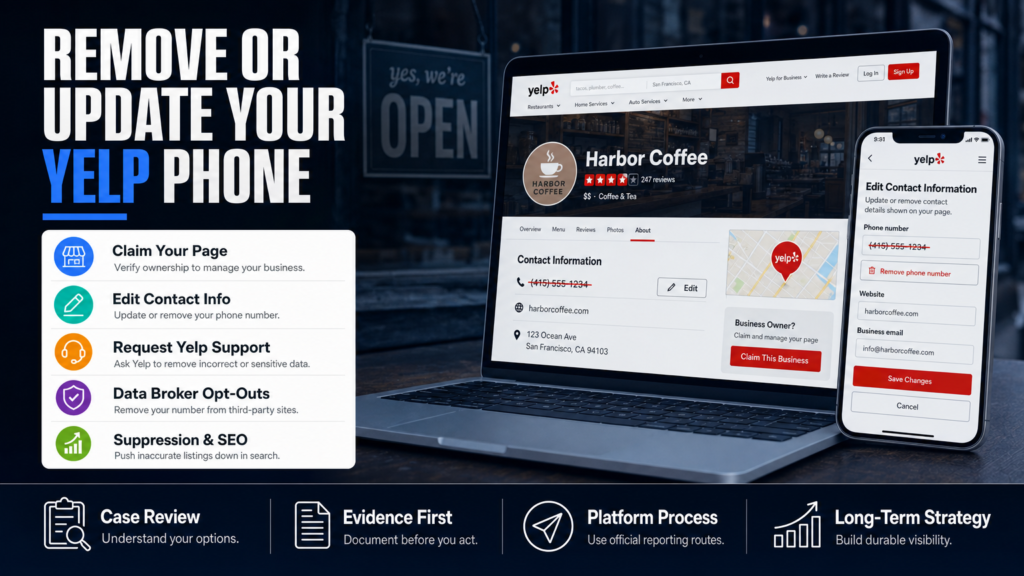
You’ve found your personal or business phone number on a Yelp page and it’s costing you calls, leads, or privacy. This article shows exactly what to do — from editing the listing to escalating with Yelp, to alternatives when removal is not possible.
Below you’ll get step-by-step instructions for how to remove phone number from Yelp, the different channels to contact Yelp Business customer service, how to update a wrong business number, and the specific steps to cancel Yelp business ads if they are complicating contact info.
We also cover practical mitigation when removal isn’t available: suppression via SEO, data-broker opt-outs, templates you can use, and realistic timeframes with caveats about platform control.
If you’re a busy professional (doctor, lawyer, local business owner) or a brand manager, skim the action steps and then follow the prioritized checklist in ‘Quick Action Plan’.
Table of Contents
- How Do I Change The Phone Number On My Yelp Account?
- How Can I Contact Yelp Business Customer Service?
- How Do I Update My Business Phone Number When The Listing Is Wrong Or Closed?
- How To Cancel Yelp Business Ads (And Why That Can Fix Phone Issues)
- When Removal Is Not Available: Suppression, Data Brokers, And Mitigation
- Quick Action Plan — Prioritized Checklist
- Monitoring And Follow-Up: How Long Changes Take And What To Expect
- What To Do If The Listing Contains Defamatory Or Sensitive Personal Information
- DIY vs Agency: When To Do It Yourself Or Hire Help
- Example: Clinic Phone Number Replaced By Unknown Contact
- Common Mistakes People Make Trying To Remove A Yelp Phone Number
- Best Practices For Correcting Or Removing A Phone Number On Yelp
- Expert Tips
- Conclusion
- Why Businesses Choose Your Reputation Agency
- Frequently Asked Questions
How Do I Change The Phone Number On My Yelp Account?
If you own or manage the Yelp business page you should change the phone number from the business account dashboard. If you don’t have the page claimed, you’ll need to claim it first.
The steps below cover both desktop and mobile; after you save changes, Yelp’s systems may take hours to reflect edits publicly and sometimes longer if the listing has edits under review.
- Sign in at https://biz.yelp.com/ with the email used to claim the page.
- From Your Biz Dashboard choose the business and click ‘Edit business info’.
- Replace the phone number in the ‘Phone’ field; double-check country and formatting.
- Save changes and check the public page. If the change doesn’t appear, allow 24–72 hours.
- If you don’t have access, use Yelp’s claim process and verify ownership (they use email/phone verification and sometimes a postcard).
- Claim or sign in to your Yelp for Business account (business.yelp.com).
- Open the business page, choose ‘Edit business info’ or ‘Manage business info’.
- Update the phone number field and save changes.
- Monitor the listing for up to 24–72 hours while Yelp applies the change and crawlers re-index.
If You Can’t Claim The Page
If you can’t claim a page because a previous manager claimed it or the phone verification is with someone else, use Yelp’s ‘Report an issue’ workflow to request ownership transfer.
Yelp may ask for proof of ownership — examples include business registration, a recent utility bill, or a website domain email. Don’t upload private documents to public forms; follow Yelp’s secure submission instructions.
- Attempt ‘Claim This Business’ and follow prompts.
- If blocked, submit ‘Business ownership request’ through Yelp Support.
How Can I Contact Yelp Business Customer Service?
Yelp’s official support channels are the primary route when editing via your dashboard fails. Support responses vary by volume and content, so keep expectations realistic about timing.
If the phone number on Yelp is tied to a harmful review or is actively harming conversions, read our piece on When One Yelp Review Threatens Your Business’s Bottom Line for context on escalation and evidence collection.
- Log into Biz.Yelp and open the Support/Help menu.
- Select the topic (e.g., ‘Business Information’ or ‘Claim & Verify’).
- Attach screenshots and a concise explanation of the incorrect phone number and what you want changed.
- Follow up politely if no response in 72 hours; escalate via the Ads support line if you are a paying advertiser.
- Use the Yelp Business Support form in your dashboard for listing issues.
- Contact Yelp via the business support center: https://biz.yelp.com/support.
- If you have Yelp Ads, use the Ads Support phone and chat links inside the Ads Manager.
When To Use Social Or Public Channels
Public tweets or Facebook messages sometimes get faster acknowledgement, but they also expose your issue publicly. Use social only for status updates — avoid posting private documents or sensitive details.
Document every contact attempt (dates, ticket numbers, names) in case you later need legal or PR escalation.
- Post to @YelpSupport with a brief summary and a ticket reference if available.
- Keep public messages factual; include a ticket number if you have one.
How Do I Update My Business Phone Number When The Listing Is Wrong Or Closed?
Wrong phone numbers appear for several reasons: scraper errors, merged pages, automated data from third-party directories, or a previously closed number that auto-populated. The update path depends on whether the page is active, closed, or a duplicate.
If you are a medical practice concerned about lost appointments after a phone error, see our article When A Single Yelp Review Threatens Your Practice for additional remediation tactics that apply to clinical practices.
- Search Yelp for duplicates of your business; note page URLs and phone numbers.
- On each duplicate, click ‘Is this your business?’ or ‘Edit business info’ and submit the correct phone number.
- If duplicates persist, submit a list with URLs to Yelp Support requesting a merge or closure, including documentation showing correct contact info.
- Identify whether the Yelp page is marked ‘Open’ or ‘Closed’.
- If duplicate pages exist, report duplicates to Yelp for merge/closure.
- If the page is closed, use the ‘Suggest an edit’ or business owner dashboard to reopen and correct contact details.
Closed Business Pages
If a listing shows ‘Closed’ but callers still reach you, create a new verified listing and request Yelp to merge reviews/pages. Yelp may keep an archive of a closed page; merging is not guaranteed.
When pages are merged or closed, review visibility and phone fields can still be affected by third-party directories that re-index Yelp.
- Create a new claimed page if necessary; mark it ‘Open’ with correct phone.
- Ask Yelp Support to merge or indicate the correct primary listing.
How To Cancel Yelp Business Ads (And Why That Can Fix Phone Issues)
If your phone number is controlled by an employee who left or by an ads-managed setting, cancelling Yelp Ads can remove ad-driven contact overrides. Be careful: cancelling ads affects visibility and any ad-based call-tracking numbers.
You can cancel ads from Ads Manager, but billing and contractual terms apply. If you’re unsure about ad charges or a roll-over contract, collect your billing statements before cancelling.
- Log into your Yelp Ads account and go to ‘Billing’ or ‘Manage Ads’.
- Locate the subscription and select ‘Cancel’ or ‘Pause’.
- Confirm cancellation and download invoices for your records.
- If a call-tracking phone number was provided by Yelp as part of Ads, request de-provisioning so the public listing reverts to your primary business number.
- Cancel through your Yelp Ads dashboard under Billing or Subscription settings.
- Contact Ads Support if immediate disconnection is necessary — they may be able to expedite number changes for advertisers.
- Review your contract for minimum terms or early termination fees.
If Ads Support Is Unresponsive
If Ads Support is slow, escalate using in-dashboard chat or the Ads support phone. Document all support contacts and ticket numbers. If immediate correction is required for legal/health-safety reasons, include that in your support request as it can prioritize review.
- Use screenshot proof of the incorrect number and analytics showing lost calls if available.
- Ask for an expedited review in writing and keep records.
When Removal Is Not Available: Suppression, Data Brokers, And Mitigation
Sometimes Yelp will not remove a phone number because it is a public business contact or because the information is sourced from data brokers. In those cases, your realistic options are suppression, correction across directories, and opt-outs from data brokers.
We evaluate whether the content may qualify for removal or review, and when removal is unavailable, we pursue mitigation and suppression through SEO and data-cleaning. For example, if your personal phone appears across people-search sites, see our guidance on removing directory listings like Whitepages: When Whitepages Shows Up on Every Background Search.
- Compile a list of directories and data brokers showing the wrong phone number.
- Use each site’s opt-out process or contact form; track submissions and confirmation emails.
- Deploy positive, high-authority content (company site contact page, staff bios, press mentions) optimized for your brand + phone to push the Yelp entry lower in search results.
- Monitor results with reputation monitoring for at least 60–180 days — search visibility changes depend on algorithm updates and indexing cadence.
- Submit opt-outs to major data brokers (PeopleFinders, Whitepages, Spokeo, Intelius).
- Correct the phone number at source directories (Google Business Profile, Yellowpages, Facebook).
- Use suppression: create authoritative pages (site, LinkedIn, branded profiles) that rank above the Yelp entry.
Why Data-Broker Opt-Outs Matter
Yelp sometimes pulls contact info from broader web sources; if incorrect data lives on multiple directories, Yelp may re-populate the wrong number from those sources.
Removing the number at the data-broker level reduces the chance it propagates back to Yelp or other aggregators.
- Prioritize opt-outs at high-volume brokers first (Whitepages, Spokeo).
- Keep records: many brokers require re-submission after re-crawls.
Quick Action Plan — Prioritized Checklist
If you need immediate mitigation, follow this checklist in order. Each step is designed for speed and to preserve evidence in case escalation is required.
Timing depends on the platform, publisher, evidence, legal complexity, and search-engine behavior; expect variable lag times.
- Follow steps in ‘How Do I Change The Phone Number On My Yelp Account?’ immediately.
- If public-safety or legal risk exists, note that elevated support or legal review may be necessary; the content may warrant legal review.
- Continue monitoring and document all steps, responses, and ticket numbers.
- 1) Claim your Yelp business page (or confirm ownership).
- 2) Update the phone field in Biz.Yelp and save.
- 3) Submit a Support ticket with screenshots if change fails.
- 4) If ads are active, check Ads Manager and cancel or de-provision tracking numbers.
- 5) Submit data-broker opt-outs for any third-party directories showing the wrong number.
- 6) Create/optimize authoritative pages with the correct contact info to begin suppression.
When To Consider Professional Help
If the phone number continues to reappear, your listing is being targeted, or you are losing revenue and hires, consider contacting a reputation specialist who can coordinate technical suppression, data-broker opt-outs, and legal referrals.
We develop SEO reputation strategies intended to improve the visibility of credible information; outcomes vary according to content strength and authority of competing sources.
- Professionals can automate opt-outs, craft suppression content, and coordinate documentation for legal review.
- Ask any firm for a written scope and no absolute guarantees of removal or ranking.
Monitoring And Follow-Up: How Long Changes Take And What To Expect
There is no universal timeframe for platform edits, merges, or suppression to appear. Some edits publish within hours; others take weeks depending on Yelp’s review queues and search engine re-indexing.
An estimated timeline can be provided after an individual assessment. Below are typical ranges with caveats.
- After each change, run searches for your business name + city and note positions.
- Schedule weekly checks for the first month, then monthly for three months.
- Keep all confirmation emails and support ticket IDs for potential escalation.
- Yelp edit publicization: hours to 72 hours (may be longer during review).
- Data-broker opt-outs: 2–12 weeks (depends on broker re-crawl cycles).
- Suppression via SEO: 30–180 days to see measurable change in first-page results.
If Phone Number Returns After You Fix It
If the phone number reappears, it’s often because a third-party directory still feeds the wrong data. Repeat opt-outs and request merges; maintain a log of where the wrong number is visible.
If the issue appears malicious (someone intentionally posting wrong contact data), the content may warrant an abuse/takedown review and legal evaluation.
- Re-check sources where the wrong number was found and re-submit opt-outs.
- Consider a security audit and privacy hardening to prevent future exposure.
What To Do If The Listing Contains Defamatory Or Sensitive Personal Information
If the Yelp page includes defamatory statements, doxxing, mugshots, or other sensitive personal information tied to the phone number, the item may qualify for removal under platform policies or legal statutes. The content may warrant legal review.
We coordinate with qualified legal professionals when a matter requires legal analysis; a qualified attorney can determine whether a legal claim may be available.
- Collect screenshots and URLs showing the violation.
- Submit a detailed report to Yelp citing the specific policy (e.g., doxxing or harassment).
- If the platform declines removal, consult an attorney to evaluate legal options and next steps.
- Document the content and preserve screenshots with timestamps.
- Use Yelp’s ‘Report review’ or ‘Report content’ functions for policy-based violations (harassment, doxxing, impersonation).
- Consider legal referral if the content is demonstrably false and injurious.
When Public Interest Limits Removal
Some truthful, newsworthy, or government-record information may not be removable, even if embarrassing. Platform decisions remain under the platform’s control.
If removal is unavailable, correction, apology, or suppression strategies may be more practical than litigating.
- Assess whether the information is a factual public record — such records are often not removable on policy grounds.
- Plan a mitigation strategy focusing on visibility and context rather than absolute removal.
DIY vs Agency: When To Do It Yourself Or Hire Help
A short comparison to decide whether to handle a Yelp phone-number issue yourself or hire a reputation firm.
| DIY | Agency |
|---|---|
| Cost | Higher upfront, but scalable for complex cases |
| Speed | Can accelerate evidence collection and escalation |
| Technical Steps | Handles opt-outs, SEO, and monitoring tools |
| Legal Coordination | Often includes legal referrals and documentation support |
| Time Commitment | Less time for you; project-managed |
| Control | You retain control; contractor executes |
Example: Clinic Phone Number Replaced By Unknown Contact
Hypothetical: A midsize outpatient clinic (CityHealth) noticed patients calling an unfamiliar number listed on Yelp and appointment no-shows increased. The office manager attempted to edit the phone in Biz.Yelp but the listing was claimed by a third party and the number persisted.
Process followed (example workflow):
- Within 72 hours the Biz.Yelp change appeared; data-broker corrections took 6 weeks to propagate.
- Search visibility began to shift after 30 days as the clinic’s contact page and LinkedIn profiles outranked the old listing.
- The clinic continued monitoring for 90 days and kept logs of all Yelp support interactions.
- Step 1: Office claimed the page and submitted ownership verification with a business license and utility bill.
- Step 2: Clinic updated the phone through Biz.Yelp; change did not publish due to a pending duplicate-merge request.
- Step 3: Clinic submitted a detailed Support ticket with screenshots and evidence of appointment loss.
- Step 4: Clinic submitted opt-outs to two major data brokers and corrected the phone on Google Business Profile and Facebook.
- Step 5: Clinic deployed a new contact page with schema markup and a staff directory to begin suppression.
Common Mistakes People Make Trying To Remove A Yelp Phone Number
These are frequent errors that slow resolution or make the problem worse.
Mistake 1 — Not Claiming The Page First
Trying to edit a listing without claiming it prevents access to owner controls. Always claim the page through Biz.Yelp so you can update fields and contact support as the verified owner.
Mistake 2 — Only Fixing Yelp And Ignoring Data Brokers
Yelp often sources contact info from third-party aggregators. If you don’t correct the source, the wrong number can reappear after re-crawls.
Mistake 3 — Publicly Calling Out Individuals
Posting accusatory public messages or naming alleged individuals can escalate conflict and reduce willingness of platforms to help. Keep public communications factual and minimal.
Mistake 4 — Expecting Guaranteed, Fast Removal
Platforms control their own policies and timelines. Avoid assuming immediate removal — prepare mitigation and monitoring steps instead.
Mistake 5 — Failing To Document Interactions
Not saving support ticket numbers, screenshots, and dates makes later escalation or legal review much harder. Always keep a timeline with proof.
Best Practices For Correcting Or Removing A Phone Number On Yelp
Adopt a methodical approach: claim, correct, document, and monitor. Below are practices that save time and preserve options if escalation becomes necessary.
1. Claim And Verify Ownership Immediately
Claiming gives you the dashboard tools to edit info and submit support requests. Use official business emails or documentation for verification.
- Prefer a domain-based email (you@yourdomain.com) for verification where possible.
2. Keep Evidence And A Log
Record screenshots before and after edits and log support interactions. This matters for PR, legal referral, or future disputes.
- Store timestamps and ticket numbers in a shared document.
3. Correct The Whole Ecosystem
Fix the phone number on Google Business Profile, Facebook, industry directories, and with major data brokers to prevent re-propagation.
- Prioritize directories that feed multiple services.
4. Use Suppression Where Removal Won’t Happen
Create authoritative pages (your site contact page, staff bios, press releases) and optimize them to push the incorrect entry lower in search results.
- Use clear contact schema and consistent NAP (Name, Address, Phone) formatting on your site.
5. Respect Platform Policies And Avoid Deceptive Tactics
Do not use fake accounts, falsified ownership claims, or retaliatory posts. These can get your content removed or your account penalized.
- Work within Yelp’s official reporting and review processes.
Expert Tips
- Always take screenshots of the incorrect phone number before you change anything — platforms often reject later claims without proof.
- When you submit a Yelp support ticket, include a concise bullet list of requested corrections and the exact URL to avoid back-and-forth.
- If a call-tracking number provided by Ads is the issue, request de-provisioning rather than outright canceling if you need ongoing ad exposure.
- Prioritize correcting Google Business Profile first; Google often drives the directory ecosystem that feeds other listings.
- If incorrect data is clearly coming from a specific directory, target that source with opt-outs before re-submitting changes to Yelp.
- Keep business hours and phone formatting consistent across all profiles — small mismatches can trigger merge conflicts or overwrites.
- If you suspect malicious edits (someone purposely adding the wrong phone), flag it as abuse and consider legal counsel.
- Set up monitoring alerts for mentions of your business name plus phone to catch re-appearances quickly.
Conclusion
Removing or updating a phone number on Yelp is usually straightforward if you control the business page; the complexity grows when duplicates, data brokers, or ad-tracking numbers are involved. Platform control, third-party sources, and policy reviews mean there are rarely instant guarantees.
Work methodically: claim the page, document everything, correct the ecosystem (Google, Facebook, data brokers), and use suppression when removal is unavailable. If you’re losing revenue or facing targeted abuse, consider professional coordination to manage escalation, legal referrals, and a sustained visibility strategy.
Why Businesses Choose Your Reputation Agency
Managing your reputation takes more than monitoring reviews or publishing the occasional blog post. It takes a strategy built around your situation, your industry, and what is actually showing up in search.
Your Reputation Agency works with businesses, executives, healthcare professionals, attorneys and growing brands. Our services include:
- Remove or suppress negative search results and news articles from Google
- Review removal and remediation (Google, Yelp, Facebook, Trustpilot, industry sites)
- Data broker and people-search opt-outs to remove personal information
- Mugshot and arrest-record removal or suppression
- Takedowns of defamatory, false, or malicious posts (social, blogs, forums)
- Online crisis management and rapid-response reputation repair
- Impersonation and fake account removal on social platforms
- Reputation monitoring, alerts, and ongoing surveillance
- First-page SEO and suppression strategies to bury negative content
- Digital security audits and privacy hardening to prevent future exposure
Frequently Asked Questions
1. How do I change the phone number on my Yelp account?
Sign in to your Yelp for Business account, go to ‘Edit business info’ for the relevant listing, update the phone field, and save. If the change doesn’t appear within 24–72 hours, submit a Support ticket via your dashboard with screenshots and ticket IDs for follow-up.
2. How can I contact Yelp Business customer service?
Use the Yelp Business support form inside your Biz.Yelp dashboard or visit the Business support center (biz.yelp.com/support). Ads customers can access Ads Support from the Ads Manager. Keep records of ticket numbers and any chat transcripts for escalation.
3. How do I update my business phone number if the listing is wrong?
Claim the page, correct the phone via the dashboard, and if duplicates or closed pages are involved, request merges or closures through Yelp Support. Also correct the number on Google Business Profile and major directories to prevent re-population.
4. How to cancel Yelp business ads?
Cancel or pause from your Yelp Ads dashboard under Billing or Manage Ads. Review your contract for any minimum terms or fees. If ads provided a call-tracking number, request de-provisioning so the public listing reverts to your primary number.
5. What if Yelp refuses to remove a phone number?
If Yelp declines removal, consider suppression strategies (SEO, authoritative pages) and data-broker opt-outs. We evaluate whether the content may qualify for removal or review, and pursue technical and reputational mitigation when removal is unavailable.
6. How long does it take for a phone-number edit to appear on Yelp?
Edits can publish in hours or take up to several days while Yelp reviews changes; data-broker corrections and search-engine re-indexing can take weeks. Timing depends on platform review queues, evidence provided, and indexing cycles.
7. Will removing my phone on Yelp stop it appearing elsewhere?
Not necessarily. Yelp may source data from third-party directories; you should submit opt-outs to major data brokers and correct the phone on Google, Facebook, and industry directories to prevent re-propagation.
8. Can I delete a Yelp business account entirely to remove the phone number?
Deleting or closing a Yelp business page may remove the listing but could also remove reviews and visibility. Yelp’s processes for deletion or closure vary and may not remove content cached elsewhere. Consider the trade-offs and document everything before taking down a page.
9. When should I consult an attorney about a phone-number listing?
Consult an attorney if the listing includes defamatory content, deliberate doxxing, impersonation, or if the listing causes demonstrable financial harm that platform channels can’t resolve. A qualified attorney can determine whether a legal claim may be available.
This content provides general information and does not constitute legal advice. The available options and likely outcomes depend on the facts, evidence, platform policies, applicable law, jurisdiction, and public-interest considerations.
Past examples do not guarantee future results. Removal, correction, deindexing, and search-position changes depend on third parties and circumstances outside Your Reputation Agency’s control.