Quick answer: remove your information from PeopleFinders
Remove your information from PeopleFinders by finding the exact record, saving the profile URL and exposed fields, following the official opt-out procedure, and completing required verification.
Check search results after processing, correct source records, keep confirmation details, and monitor for reappearance.
Finding your name, phone number, home address, relatives, or other personal details on a people-search website can be unsettling. If you have discovered a profile about yourself on PeopleFinders, you may be wondering How to Remove Your Information from PeopleFinders and whether opting out will also remove the information from Google and other websites.
The short answer is that you can request that PeopleFinders suppress your listing from its website. However, removing one profile does not automatically remove your information from every people-search website or from the original sources where the data may have originated.
That distinction is important.
This guide explains how the PeopleFinders opt-out process works, what you should expect after submitting a request, what to do if information reappears, and how professional reputation management can help when your privacy concern extends beyond a single data-broker website.
Table of Contents
- What Is PeopleFinders?
- Why Your PeopleFinders Listing Matters
- How to Remove Your Information from PeopleFinders
- Step-by-Step PeopleFinders Opt-Out Guide
- What Happens After You Submit an Opt-Out Request?
- Does Removing Your PeopleFinders Listing Remove It From Google?
- Real Example: Removing a PeopleFinders Profile
- Common Mistakes to Avoid
- Best Practices for Protecting Your Online Privacy
- Expert Tips for Managing People-Search Listings
- When Professional Reputation Management Makes Sense
- Frequently Asked Questions
- Conclusion
- Protect Your Personal Information and Online Reputation
What Is PeopleFinders?
PeopleFinders is a people-search service that allows users to search for information associated with individuals.
Depending on the available record, people-search profiles can contain information such as:
- Full name
- Current or previous addresses
- Phone numbers
- Possible relatives
- Possible associates
- Public-record information
- Property-related information
- Other publicly available data
The exact information displayed can vary from person to person.
People-search websites generally operate by aggregating information from multiple sources. As a result, removing your profile from one website does not necessarily eliminate the underlying information everywhere else.
This is one reason privacy protection requires more than completing a single opt-out form.
Why Your PeopleFinders Listing Matters
At first glance, a people-search profile may seem like a minor privacy inconvenience.
For some people, however, it can create genuine concerns.
Personal Privacy
Your name and contact information can make it easier for strangers to locate information associated with you.
Professional Reputation
Business owners, executives, doctors, lawyers, real estate professionals, and other public-facing professionals may not want outdated or personal information appearing alongside their professional identity.
Digital Footprint
People-search websites are only one part of your broader digital footprint.
Someone searching your name may encounter:
- People-search profiles
- Social media accounts
- Business listings
- News articles
- Old directories
- Public records
- Review websites
- Professional profiles
That is why removing one listing should be viewed as one step in a broader privacy and reputation strategy.
If you want to understand the wider process, our guide on The Anatomy of a People-Search Listing and How to Fix It explains how these listings can be structured and why individual data points may appear across multiple sources.
How to Remove Your Information from PeopleFinders
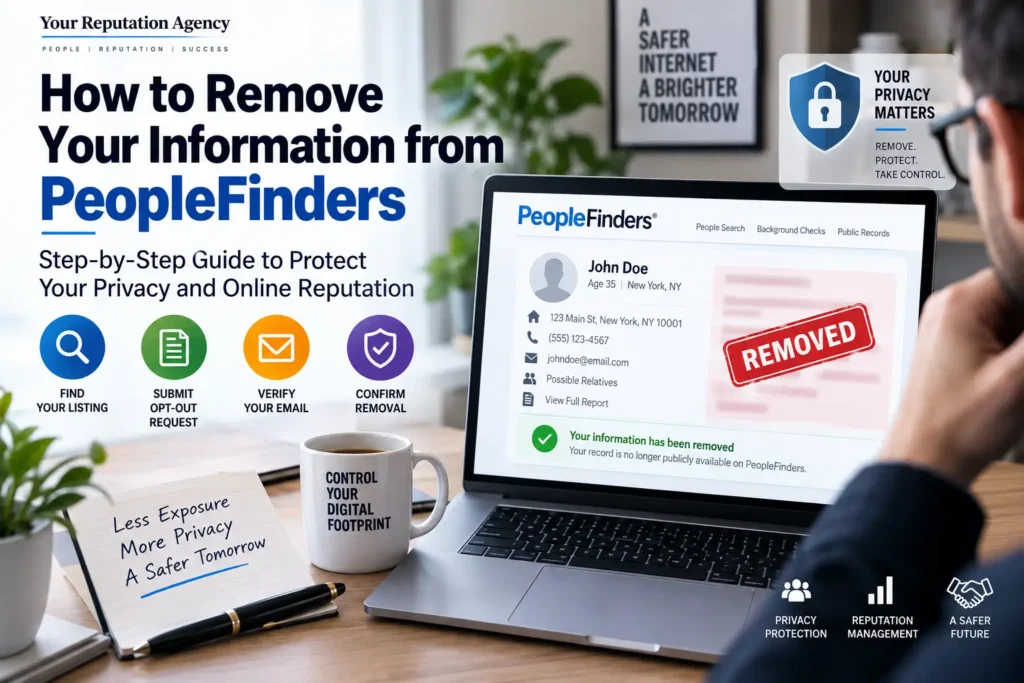
The basic process is straightforward:
- Find your PeopleFinders listing.
- Open the PeopleFinders opt-out process.
- Submit the required information.
- Complete any email verification or additional confirmation step.
- Complete the record-suppression request if prompted.
- Wait for processing.
- Search PeopleFinders again to confirm the listing is no longer publicly displayed.
- Repeat the process if another matching listing remains.
PeopleFinders’ current opt-out process can change over time, so always follow the instructions displayed on its official opt-out page when submitting your request.
Recent reports of the process describe an initial request followed by email verification and a further record-matching or suppression step. Some users may see slightly different fields depending on the current form and their record.
Step-by-Step Guide: How to Remove Your Information from PeopleFinders
Step 1: Search for Your PeopleFinders Profile
Start by visiting PeopleFinders and searching for yourself.
Use information that helps distinguish you from people with similar names, such as:
- Full name
- City
- State
- Previous location
- Other identifying details requested by the website
If you have a common name, be especially careful.
You do not want to submit an opt-out request for another person with a similar name.
Once you identify your listing, save the profile URL if the current PeopleFinders process provides one. Having the exact record can make the matching process easier.
Step 2: Open the PeopleFinders Opt-Out Page
Go to the official PeopleFinders opt-out page.
Look for the privacy or opt-out option and follow the current instructions provided by PeopleFinders.
The process has changed over time, so do not rely on an old screenshot or outdated tutorial.
Recent guides and consumer reports indicate that the process may involve entering your name and email, completing a CAPTCHA or similar verification, and then confirming the request through email.
Step 3: Submit Your Request Carefully
Enter the information requested by the form.
Pay close attention to spelling.
If the information you submit does not sufficiently match the listing, the request may not successfully suppress the correct record.
Before submitting, check:
- Your full name
- Location
- Profile URL, if requested
- Email address
- Any additional identifying information requested
- CAPTCHA or verification requirements
Avoid submitting unnecessary information beyond what the legitimate opt-out process requires.
Step 4: Complete Email Verification if Requested
Depending on the current PeopleFinders workflow, you may receive an email asking you to confirm the request.
Check your:
- Inbox
- Spam folder
- Promotions folder
- Junk folder
Some current guides report that the verification link may expire, so it is sensible to complete the confirmation promptly if an email is sent.
Step 5: Complete the Additional Suppression Form
One of the easiest mistakes is assuming that clicking the email verification link necessarily completes the entire process.
Current reports indicate that PeopleFinders may require an additional form or confirmation step after the initial request.
Follow the instructions shown after verification and complete every required step.
Do not assume the process is finished until you have submitted the final request.
Step 6: Wait for Processing
Processing times can vary.
Third-party guides currently report different timeframes, generally ranging from a few days to around a week or more depending on the workflow and circumstances.
Rather than relying on an exact promised timeframe, keep a record of:
- Date submitted
- Email used
- Profile URL
- Confirmation email
- Screenshots
- Any request or reference information
This makes follow-up much easier if the listing remains visible.
Step 7: Verify the Removal
After a reasonable processing period, return to PeopleFinders.
Search your name again.
Try variations such as:
- Full name + city
- Full name + state
- Full name + previous city
- Name variations
If the original listing still appears, check whether you have another matching profile or whether the previous request failed to suppress the record.
Some current guides also warn that information can reappear after fresh data is added to the underlying data sources.
What Happens After You Submit an Opt-Out Request?
An important distinction is often overlooked:
Removing your listing from PeopleFinders does not necessarily delete the underlying information from the internet.
Google explains that removing a result from Google Search does not necessarily remove the information from the source website. To remove the information from the source itself, you generally need to contact the website that hosts it.
The same principle applies here.
Think of your information as existing across multiple layers:
Original source → Data aggregator → People-search website → Search engine
Removing one layer does not automatically remove every other layer.
Does Removing Your PeopleFinders Listing Remove It From Google?
Not necessarily.
Suppose your PeopleFinders profile appears in Google today.
You successfully opt out.
PeopleFinders then stops publicly displaying the profile.
Google may eventually update its index, but that does not mean the search result instantly disappears.
Google provides a process called Results about you, which can help users identify personal information such as addresses, phone numbers, and email addresses appearing in Google Search and request eligible removals.
Google also makes an important distinction between removing a search result and removing the source information.
If the information has already disappeared from the source website but remains in Google’s index, an outdated-content or related removal process may be appropriate.
Search Engine Journal has also documented Google’s evolving personal-information removal tools and the distinction between de-indexing information and removing it from the original website.
What About Bing?
Google is not the only search engine you should consider.
Microsoft explains that Bing may remove certain search results in limited circumstances, but removing a search result from Bing does not necessarily remove the information from the original website.
Therefore, if privacy is the goal, consider the entire search ecosystem rather than focusing on Google alone.
Real Example: Removing a PeopleFinders Profile
Imagine a business owner named Sarah discovers a PeopleFinders profile containing:
- Her full name
- An old address
- A previous phone number
- Possible relatives
Sarah completes the PeopleFinders opt-out process.
After processing, the profile is no longer publicly visible on PeopleFinders.
However, when she searches Google, she still finds an old result.
At this point, Sarah has two separate problems:
Problem 1: PeopleFinders listing
Problem 2: Search-engine visibility
She should not assume that completing the PeopleFinders opt-out automatically solves both.
Instead, she can:
- Confirm that the PeopleFinders profile is suppressed.
- Search Google for the old result.
- Determine whether the information is still present on the source page.
- If the source has removed it, investigate Google’s outdated-result options.
- If the information remains on the source, contact the source website.
- Search Bing and other major platforms.
- Check other people-search websites for similar information.
- Continue monitoring her name.
This is the difference between a single-site opt-out and a broader digital privacy strategy.
Common Mistakes When Removing Your Information
1. Assuming One Opt-Out Removes Everything
It doesn’t.
PeopleFinders is only one source among many.
Our article, The Truth About People Search Websites, explains why information can continue appearing across multiple people-search platforms.
2. Skipping Email Verification
If the current process sends a verification email, failing to complete it may leave the request unfinished.
3. Forgetting Multiple Listings
You may have more than one listing because of:
- Previous addresses
- Name variations
- Common names
- Different data sources
Search carefully after completing the first request.
4. Assuming Google Removal Equals Internet Removal
Google is a search engine, not the owner of every webpage it indexes.
Google itself states that removing a result from Search does not necessarily remove the information from the source webpage.
5. Using Outdated Instructions
Privacy forms change.
A tutorial from several years ago may show buttons, fields, or processes that no longer exist.
Always verify the current process on the official website.
6. Forgetting About Other Search Engines
Your personal information can appear in Bing and other search environments.
7. Stopping After One Successful Removal
Data can change over time.
A listing that disappears today may reappear later if new information is added to the data ecosystem.
Best Practices for Protecting Your Online Privacy
Removing a PeopleFinders listing is useful, but long-term privacy requires a broader strategy.
Audit Your Name Regularly
Search your full name, common variations, and your name with your city or state.
Check People-Search Sites
Search for your name on major people-search platforms and record where your information appears.
Keep Track of Opt-Out Requests
Maintain a simple spreadsheet containing:
| Website | Date Submitted | Status | Follow-Up |
|---|---|---|---|
| PeopleFinders | Date | Pending/Removed | Recheck |
| Other Data Broker | Date | Pending/Removed | Recheck |
| Search Engine | Date | Pending/Approved | Recheck |
Review Your Public Profiles
Your social media and professional profiles can also contribute to your public digital footprint.
Reduce Unnecessary Public Information
Review old profiles and directories and remove information you no longer need to display publicly.
Monitor Search Results
A proactive Reputation Monitoring strategy can help you identify new mentions and search-result changes before they become bigger concerns.
Expert Tips for Managing People-Search Listings
Think Beyond One Website
The biggest mistake is treating PeopleFinders as the entire problem.
It is only one component of a larger information ecosystem.
If your name appears on multiple people-search websites, you may need a coordinated approach.
Our resource How TruthFinder and People Search Sites Aggregate Data: What You Need to Know explores this broader ecosystem.
Protect Your Professional Identity
If you are a CEO, entrepreneur, lawyer, doctor, consultant, or other public-facing professional, personal information can become connected to your professional search results.
In these cases, privacy and reputation management often overlap.
Build Stronger Positive Search Assets
Privacy protection is only one side of reputation management.
You should also make sure important professional information is easy to find.
That can include:
- Your official website
- Professional biography
- Company profile
- Industry profiles
- Author pages
- Social profiles
- Media mentions
- Educational content
Our guide on How to Protect Your Brand Name in Google Search explains how businesses and professionals can build a stronger branded search presence.
Monitor After You Opt Out
Do not assume the process is permanent.
Schedule periodic checks.
This is particularly important if you have moved recently, changed your name, launched a business, or become more publicly visible.
How People-Search Sites Fit Into Online Reputation Management
People-search listings are primarily a privacy issue, but they can also affect reputation.
Consider a business owner whose name search produces:
- Their professional website
- Their LinkedIn profile
- A news article
- An old people-search listing
- An outdated directory
- A negative review
The individual may want the people-search listing removed because it exposes personal information.
At the same time, they may want their overall search presence to better reflect their current professional identity.
This is where privacy work and ORM can intersect.
YourReputation.agency provides broader Online Reputation Protection Services for individuals, executives, and businesses that need a structured approach to protecting their online presence.
When Should You Consider Professional Help?
A simple PeopleFinders opt-out may be manageable on your own.
However, professional assistance can make sense when the problem extends beyond one listing.
Consider professional reputation support if:
- Your information appears across many data brokers.
- Your name search produces unwanted personal information.
- Negative content ranks prominently for your name.
- You are a public-facing executive.
- You operate a personal brand.
- You have experienced online harassment or privacy concerns.
- Your business reputation is connected to your personal identity.
- You need ongoing monitoring.
- You do not have time to manage multiple opt-outs.
- You want a broader digital reputation strategy.
For executives and public-facing professionals, Executive Reputation Management can address reputation issues connected to the individual’s professional identity.
For individuals, Personal Reputation Management provides a broader framework for managing online visibility and reputation concerns.
Frequently Asked Questions
1. How to Remove Your Information from PeopleFinders?
To remove your information from PeopleFinders, locate your listing, visit the official opt-out page, submit the requested information, complete any verification steps, and follow the final suppression instructions. After processing, search PeopleFinders again to confirm the listing is no longer publicly displayed.
2. Is PeopleFinders opt-out free?
The PeopleFinders opt-out process is presented as a free privacy option. You should not need to purchase a report to submit an opt-out request. Always use the official PeopleFinders privacy or opt-out page rather than paying a third party simply to submit the basic request.
3. How long does PeopleFinders take to remove information?
Processing time can vary. Current third-party guides report anything from a few days to roughly a week or longer depending on the request and current workflow. Verify the result yourself rather than relying solely on an expected timeframe.
4. Does PeopleFinders removal delete my information from the internet?
No. Suppressing a PeopleFinders listing does not automatically remove information from other websites, public records, data brokers, or search engines. PeopleFinders itself cannot control websites operated by unrelated third parties.
5. Will removing my PeopleFinders profile remove it from Google?
Not necessarily. If Google has already indexed the profile, the search result may remain until Google updates its index or an eligible removal process is used. Google recommends contacting the source website when the information itself needs to be removed.
6. Can I remove my home address from Google?
Google provides processes for requesting removal of certain personal information, including eligible home addresses, phone numbers, and email addresses. Its Results about you feature can help users find matching results and submit removal requests.
7. What if my information comes back after I opt out?
Data can be refreshed from other sources, so a listing may reappear. If that happens, repeat the applicable opt-out process and consider monitoring other people-search websites at the same time.
8. Can I remove information from all people-search websites at once?
Usually, there is no universal opt-out that covers every unrelated people-search website. Different companies may operate separate databases and have different removal processes.
9. Should I use my primary email address for an opt-out request?
Follow the current instructions provided by the website. Because privacy forms and verification processes can change, use an email address you control and can access reliably, while avoiding unnecessary disclosure of additional personal information.
10. Can YourReputation.agency remove my PeopleFinders listing?
YourReputation.agency can help assess your broader online reputation and privacy-related digital footprint. Depending on your situation, the appropriate strategy may include identifying people-search listings, monitoring search results, addressing eligible removal opportunities, and strengthening your overall online reputation.
Conclusion: How to Remove Your Information from PeopleFinders
Learning How to Remove Your Information from PeopleFinders is an important first step if you discover unwanted personal information on a people-search website.
The process generally involves finding your listing, submitting an opt-out request, completing the required verification, following the final suppression instructions, and checking the result afterward.
But remember: one opt-out does not equal complete online privacy.
Your information may exist on other data-broker websites, public records, directories, social platforms, or search engines.
That is why an effective privacy strategy should include regular monitoring and a broader understanding of your digital footprint.
If you are concerned about what people find when they search your name, don’t focus only on one website. Look at the entire picture.
Your online identity is an asset.
It deserves to be monitored and protected.
Protect Your Personal Information and Online Reputation
Finding your personal information on PeopleFinders can be frustrating. Finding the same information—or worse—across multiple websites can be even more concerning.
You can start with the basic opt-out process yourself. But if your situation involves multiple data brokers, unwanted search results, negative content, executive visibility, or broader reputation concerns, a professional strategy may save significant time and help you address the problem systematically.
YourReputation.agency helps individuals, executives, entrepreneurs, and businesses understand what appears online and develop practical reputation protection strategies.
Our team can help with:
- Digital reputation audits
- Reputation monitoring
- People-search visibility
- Personal reputation protection
- Search-result analysis
- Online reputation management
- Negative-content strategy
- Brand search protection
- Executive reputation management
If you want to understand the broader picture, explore our Online Presence & Local SEO for Small Businesses resource to see how your public digital presence can be strengthened beyond individual data-broker listings.
You can also explore our Reputation Management, Reputation Management Consultants, Reputation Management Firm, and Reputation Management Services resources to understand the different ways professional ORM can support your situation.
For broader digital footprint education, read The Hidden Risk of People-Search Sites Like Spokeo and Whitepages.
If your concern has become a larger reputation issue, our resources on Why Does My Business Name Show Negative Results on Google? Expert ORM Guide and Why Business Owners Panic After Seeing Their Name Online can help you understand what to do next.
And if you want to track your name proactively, see How to Monitor Your Name on Google Automatically.
Don’t wait until unwanted information becomes a bigger reputation problem. Take control of your digital presence today.
Contact Your Reputation Agency to discuss your situation and determine what reputation protection strategy makes sense for you.
You can also review independent client feedback on Trustpilot.