How to remove bad Facebook reviews
To remove bad Facebook reviews, first determine whether the content is a genuine negative opinion or violates a specific Meta policy. Platforms usually will not remove criticism merely because a business disputes it.
Seven practical steps
- Capture the review, reviewer profile, date, rating, and comments.
- Check whether the reviewer can be matched to a real interaction.
- Document impersonation, harassment, threats, spam, or conflicts of interest.
- Report the review using the most specific available category.
- Post a calm response that protects customer privacy.
- Resolve legitimate service problems through a private channel.
- Monitor for reposts, coordinated activity, and rating changes.
Meta’s Community Standards explain reportable conduct. Do not organize counter-reviews or accuse a reviewer publicly without evidence.
You searched for how to remove bad reviews from Facebook because a star, a short post, or an unfair Marketplace complaint is showing up in searches and costing calls or bookings. This guide explains what Facebook will and won’t remove, the practical evidence you should gather, and the next steps whether removal is possible or not.
We cover removing reviews from a Facebook Page and Facebook Marketplace, how to report violations, and what to do when the platform won’t remove the content. Where removal is an option, we explain the reporting routes and documentation that strengthen your request; where it isn’t, we show mitigation through search-engine tactics and messaging.
You’ll get concrete templates for reporting, step-by-step checklists for evidence, a comparison of DIY vs agency assistance, and a realistic timeline framework so you know what to expect. If you want a quick sense of commercial damage from a one-star review, start with What a One-Star Review Really Costs Your Practice.
Table of Contents
- How can I get a negative review removed from Facebook?
- Can you get rid of a bad review on Facebook Marketplace?
- Can I get sued for leaving a bad review on Facebook?
- Can business owners remove bad reviews on their Facebook Page?
- When removal isn’t available: suppression and mitigation options
- Prepare the evidence and your response before you report
- When to bring in attorneys or a reputation agency
- DIY vs Agency: Which path fits this Facebook review?
- Hypothetical scenario: A one-star Marketplace complaint
- Common mistakes businesses make when tackling Facebook reviews
- Best practices for handling bad Facebook reviews
- Expert Tips
- Conclusion
- Why Businesses Choose Your Reputation Agency
- Frequently Asked Questions
How can I get a negative review removed from Facebook?
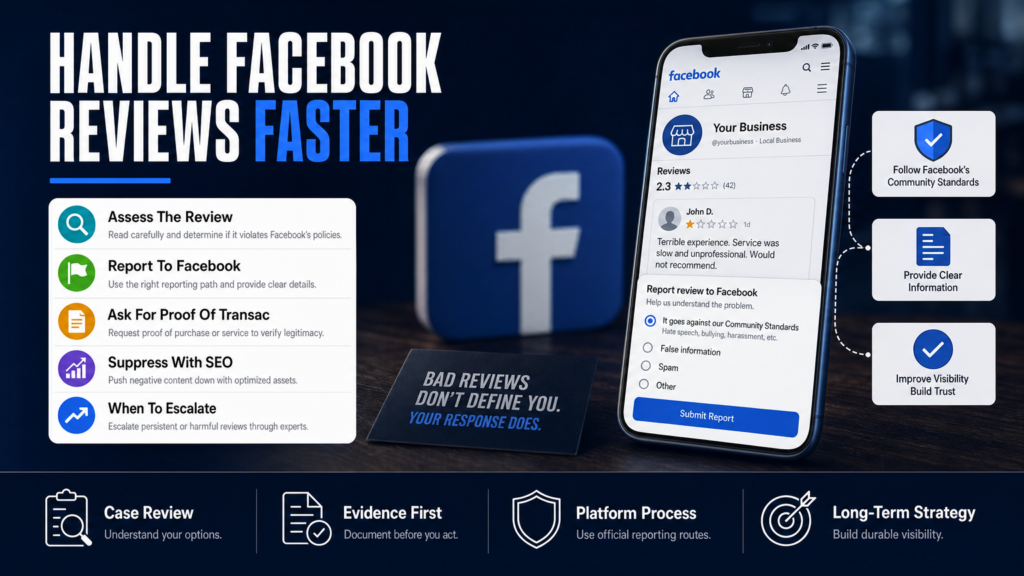
Facebook will remove content that violates its Community Standards or Commerce Policies, but it does not remove honest negative opinions simply because they hurt your business. To pursue removal you must show a policy violation (harassment, hate speech, spam, fake account, privacy violation, impersonation, or clear false claims) or that the reviewer violated Marketplace rules.
Start by documenting the review and collecting corroborating evidence: screenshots, URLs, order records, messages, timestamps, and any identity information. Facebook’s review decisions depend on the content, evidence, and whether the account appears legitimate.
- Step 1 — Gather Evidence: Export screenshots, order records, and serial timestamps.
- Step 2 — Use Page Moderation Tools: From your Page, hide or delete the review (if it’s a comment you can remove; reviews tied to ratings may need reporting).
- Step 3 — Report to Facebook: Use the report link on the review or the Business Help Center.
- Step 4 — Escalate with Documentation: If the first report is denied and you have evidence of impersonation, doxxing, or spam, submit an appeal with attachments through Facebook Business Support (if available) or Ads Manager chat where business accounts have access.
- Screenshot the review with URL and timestamp.
- Save any related messages or screenshots from the reviewer.
- Collect order/delivery records if the reviewer claims a purchase.
- Check if the reviewer’s account looks fake or is an impersonator.
Step-by-step: Reporting a review inside Facebook
Follow these steps to file a clear report from your Page or the review itself; accuracy and documentation speed decision-making.
- Open the review on desktop (reports are easier to manage there).
- Click the three dots (…) next to the review or comment and choose the appropriate report reason (harassment, hate speech, harassment, or fake account).
- Attach screenshots or links where Facebook allows file uploads; otherwise save evidence offline and reference it in your appeal.
- Record the reference number or take a screenshot of your report confirmation.
Can you get rid of a bad review on Facebook Marketplace?
Facebook Marketplace reviews are tightly coupled with transaction records. Marketplace complaints that violate Commerce Policies (scams, prohibited items, impersonation) can be removed. However, a buyer’s genuine complaint about condition or service is usually not removable simply because it’s negative.
If the review is fake (no record of purchase) or an obvious scam or extortion, focus on transaction evidence and messages to prove the reviewer did not buy the item.
- Step 1 — Pull Marketplace Records: Save the listing, buyer username, chat history, and any payment confirmation.
- Step 2 — Report the Listing/Review: Use the report feature on the Marketplace item or on the buyer’s profile.
- Step 3 — Provide Evidence in Appeal: If Facebook permits escalation, upload transaction records showing no purchase or contradictory evidence.
- Step 4 — Block and Document: If the buyer is abusive, block them and keep records in case of repeated attacks.
- Check your Marketplace order history and message thread for proof.
- Download transaction receipts or shipping confirmations.
- Look for evidence the reviewer contacted you from a different account (impersonation).
If you can’t find the transaction record
Absence of a Marketplace order record weakens the reviewer’s claim. Compile all related messages and platform screenshots. If the buyer paid off-platform (Venmo, Zelle, cash), identify and preserve those receipts; Facebook may still refuse removal but these records help in other remediation paths.
- Preserve off-platform receipts and chats.
- Ask customers politely to show proof of purchase when they complain publicly.
- Consider private resolution before escalation to reduce negative public posts.
Can I get sued for leaving a bad review on Facebook?
Leaving a truthful review is generally protected speech, but knowingly false statements of fact that defame a person or business can create legal exposure. Most lawsuits over reviews hinge on whether the reviewer presented a false factual claim, acted with malice, or deliberately fabricated evidence.
For business owners worried about exposure, a qualified attorney can advise on whether a particular review crosses the legal threshold for defamation; our role is to coordinate with counsel and preserve evidence if litigation becomes necessary.
- Step 1 — Preserve Records: Save the review and any related messages or business records.
- Step 2 — Consult Counsel: If a review includes demonstrably false statements that harm licensure or contracts, seek legal advice.
- Step 3 — Avoid Threats Publicly: Do not threaten or coerce reviewers in public replies; that can escalate matters.
- Opinion is typically protected; false factual claims are riskier.
- Context matters: a reviewer’s intent, evidence, and jurisdiction influence risk.
- Businesses sometimes respond with demand letters, but litigation is uncommon and fact-specific.
When a business can push back legally
Businesses sometimes have valid claims—fraud, extortion (demanding money to remove a review), or repeated impersonation. But legal remedies have costs and uncertain outcomes; a lawyer can assess potential claims using the evidence you’ve preserved.
- Extortion or blackmail: document threats and contact authorities.
- Impersonation: can support platform takedown plus potential legal action.
- Falsified reviews with fabricated documents: stronger legal footing exists.
Can business owners remove bad reviews on their Facebook Page?
Business owners cannot unilaterally erase legitimate reviews left by real accounts unless the content violates Facebook’s policies. What owners can do is moderate how reviews appear on their Page, respond publicly, request removal for policy violations, or temporarily turn off the Reviews feature in specific circumstances.
Disabling reviews is an option but it also removes all reviews (including positive ones) and may negatively affect search visibility and user trust.
- Step 1 — Check Page Settings: On desktop, go to Settings > Templates and Tabs > Reviews and turn it off if justified.
- Step 2 — Use Page Moderation Tools: Hide or delete comments and block repeat offenders.
- Step 3 — Report Policy Violations: Use the report flow for impersonation, spam, hate speech, or privacy breaches.
- You can hide or remove comments on your Page that violate policy.
- You can temporarily turn off Reviews (Ratings) from Page settings, but weigh trade-offs.
- Owners should never post fake positive reviews or coordinate deceptive removals.
How to temporarily disable Reviews on mobile
Disabling Reviews from the Facebook mobile app is possible but the exact menu moves periodically. Generally, open your Page, tap Settings, search for ‘Reviews’ or ‘Page Settings’, and toggle the Reviews or Rating option off. If you rely on reviews for discovery, consider suppression and response before turning Reviews off.
- Mobile path can vary by app version—use desktop if configuration is hard to find.
- Disabling Reviews removes star display and prevents new reviews.
- Turning Reviews back on restores visibility of prior reviews.
When removal isn’t available: suppression and mitigation options
If Facebook declines to remove a review because it’s an opinion or not a policy violation, your options shift to mitigation: a combination of public response, SEO to suppress the review in search results, and PR to correct the record.
Suppression and rebuilding can be effective but require ongoing effort. We develop SEO reputation strategies intended to improve the visibility of credible content about you; search results may change because algorithms, publishers, and user behavior are outside our control.
- Step 1 — Public Response: Post a calm, factual reply asking to continue the discussion privately and offering a resolution.
- Step 2 — Build Positive Content: Publish pages, bios, and listings that target the same name and keywords as the negative review.
- Step 3 — Use Monitoring: Set alerts for the review and related keywords so you can respond to new developments quickly.
- Respond professionally and briefly to the review to show prospective customers you address complaints.
- Create high-authority content (press releases, help pages, professional listings) to outrank the negative result.
- Use review generation and reputation building to overwhelm a single negative review with new positive signals.
How SEO suppression works in practice
We pursue a mix of on-site pages, high-authority directory listings, and social profiles to push the negative review lower in search results. Results vary according to the authority of the negative content and competing signals. For public examples of the stakes, see When One Trustpilot Review Costs Your Practice — And What To Do Next.
- Create new content on domains you control and trustworthy third-party sites.
- Optimize pages for the keywords a potential client would use when searching you plus the negative term.
- Track ranking movement; suppression is gradual and not guaranteed.
Prepare the evidence and your response before you report
The clearer your evidence, the better your chance of success when reporting to Facebook or involving counsel. Prepare a concise evidence packet and a neutral public reply that protects your reputation without admitting fault.
If removal is pursued legally, preserved evidence and a documented timeline improve counsel’s ability to advise. Your Reputation Agency coordinates with legal counsel when needed, but a lawyer will be required for any legal filing.
- Step 1 — Build an Evidence Folder: Save source pages, use the Wayback Machine for persistence if appropriate, and timestamp files.
- Step 2 — Draft a Public Reply Template: Thank the reviewer, acknowledge the issue generically, offer an offline contact, and avoid legally risky statements.
- Step 3 — Choose Your Escalation Path: Platform appeal, legal demand, or reputation mitigation depending on the evidence and business risk.
- Evidence packet: screenshots, raw URLs, dates, order IDs, and message threads.
- Public reply: short, professional, and offers private escalation.
- Preserve everything in a secure folder and log actions you’ve taken.
Sample public reply template
Use a short, non-confrontational reply. Example: ‘We’re sorry you had a negative experience. Please message us with your order number and we’ll review this immediately.’ This signals to future readers that you take complaints seriously without inviting a public argument.
- Avoid accusing the reviewer of lying in public.
- Do not offer refunds publicly—discuss privately to avoid setting a precedent.
- Keep replies factual and concise.
When to bring in attorneys or a reputation agency
Escalate to counsel when reviews include privacy violations (exposed personal data), extortion, impersonation, or demonstrable false claims that materially harm licensure or contracts. Lawyers are also appropriate when you need preservation letters, subpoenas, or court orders.
An agency can coordinate the technical, SEO, and PR work while counsel handles legal strategy. We evaluate whether the content may qualify for removal or review, and we pursue the legal, technical, platform-based, and reputational options available.
- Step 1 — Triage: Assess damage, gather evidence, and determine whether a legal claim is plausible.
- Step 2 — Coordinate: If hiring counsel, let the agency centralize evidence and communicate next steps.
- Step 3 — Preserve: Immediately preserve all digital evidence and avoid deleting relevant messages.
- Legal escalation is appropriate for doxxing, extortion, or repeated impersonation.
- Use an agency when you need coordinated SEO, monitoring, and PR alongside legal work.
- Expect legal and platform outcomes to depend on evidence and jurisdiction.
What an agency typically does that you might not
Agencies maintain monitoring, perform SEO suppression, craft PR messaging, and navigate platform reporting with escalation practices learned from multiple cases. They do not guarantee removals or legal results and they are not law firms; coordination with a qualified attorney is often needed for legal remedies.
- Continuous monitoring and alerting.
- SEO content creation and link building.
- Coordinated public messaging and reputation rebuilding.
DIY vs Agency: Which path fits this Facebook review?
A quick comparison to help decide whether to handle reviews internally or hire an agency.
| DIY | Agency |
|---|---|
| Cost: Lower direct spend | Cost: Recurring fees |
| Learning curve for platform policies | Experienced with policy nuances |
| Limited monitoring capacity | 24/7 monitoring and alerts |
| SEO & suppression requires skill | Dedicated SEO and PR resources |
| May struggle with escalation | Established escalation workflows |
| Full control of messaging | Coordinated counsel and PR support |
Hypothetical scenario: A one-star Marketplace complaint
A small medical supply seller finds a one-star Facebook Marketplace review claiming a device arrived damaged and that the seller refused a refund. The seller has no record of a Marketplace transaction and suspects a competitor posted the review.
Here’s how the seller proceeds step by step without assuming a guaranteed outcome.
- 1) Evidence collection: The seller compiles the listing URL, screenshot, chat logs, and a search of Marketplace orders showing no transaction.
- 2) Platform report: The seller reports the review for fraudulent behavior and impersonation, attaching the chat logs and order search screenshot where possible.
- 3) Escalation: After an initial denial, the seller uses Business Help Center chat (available to Pages with ad spend) to escalate and references the preserved evidence.
- 4) Mitigation: Parallel to reporting, the seller publishes authoritative product pages and solicits satisfied customers for new reviews to dilute the single complaint in search results.
- 5) Outcome tracking: The seller monitors search rankings and the Marketplace listing; if the review remains, the seller focuses on suppression and customer outreach.
- Save a screenshot of the review and the reviewer’s profile URL.
- Search Marketplace order history for the listing and export chat history.
- Draft a calm public reply asking for order details and offering private resolution.
Common mistakes businesses make when tackling Facebook reviews
Avoid these frequent errors—each one delays resolution or harms your reputation further.
- Responding emotionally or aggressively in public.
- Failing to preserve evidence before it disappears.
- Assuming the review will be removed for being negative alone.
Mistake 1: Public arguments with reviewers
Arguing publicly escalates visibility and signals defensiveness to other customers. A flame war can attract more attention than the original review.
- Stay factual and brief in public replies.
- Take details offline when possible.
Mistake 2: Not preserving evidence
Reviews, messages, and profiles can be edited or deleted. If you’re considering legal options or appeals, you need dated evidence preserved outside of Facebook.
- Use screenshots with timestamps and save original URLs.
- Log the actions you took and when you reported content.
Mistake 3: Paying to hide the problem
Buying fake positive reviews or offering incentives for removal is deceptive and violates platform policies. It can result in broader penalties or loss of trust.
- Build genuine reviews from real customers instead.
- Avoid any activity that could be construed as review manipulation.
Mistake 4: Turning off reviews without a plan
Disabling reviews removes both negative and positive feedback and can reduce your credibility in search results. Use this step only as a last resort and with a recovery plan.
- Consider suppression and outreach before disabling Reviews.
- Plan how you’ll rebuild positive social proof if you turn Reviews back on.
Best practices for handling bad Facebook reviews
Adopt processes that minimize damage and preserve options for escalation.
Practice 1: Standardize evidence collection
Create a template folder for review incidents with fields for screenshots, URLs, timestamps, order IDs, and chat exports. This reduces time to escalate and strengthens appeals.
- Use cloud storage with access logs for evidence preservation.
- Include a short incident timeline with each case.
Practice 2: Use calm, solution-focused replies
A short public reply shows professionalism and invites private resolution. Never provide legal threats in a public reply; preserve those for counsel.
- Acknowledge, apologize for the experience, and request private contact.
- Keep replies under 40 words when possible.
Practice 3: Monitor and solicit legitimate reviews
A steady stream of genuine positive reviews reduces the relative impact of a single negative item. Use post-service follow-ups and trusted third-party review platforms.
- Ask satisfied clients to leave feedback on Facebook or other trusted sites.
- Ensure requests comply with platform policies and industry regulations.
Practice 4: Pair technical and PR responses
If a review has broader reputational effects, coordinate your platform reporting with a short PR correction on your home page or Google Business Profile to control the narrative.
- Publish a factual FAQ or incident statement if the event is public and material.
- Coordinate messaging with legal counsel when appropriate.
Expert Tips
- Always capture the review URL—without it Facebook often treats reports as lower priority.
- If the reviewer’s account looks fake, take screenshots of friend lists and activity patterns to include in your report.
- Turn on Google Alerts and dedicated monitoring for your brand and reviewer names to catch copycats early.
- Don’t threaten legal action publicly; preserve that conversation for counsel and private channels.
- If you plan to escalate, put a hold on deleting any related content—platforms and lawyers may need the original record.
- Consider asking satisfied clients for reviews on multiple platforms to diversify your reputation signals.
- Use a neutral third-party mediator for high-value disputes before going to platform appeals or legal action.
- Keep a log of every interaction with Facebook support—dates, agents, and case numbers matter on appeal.
Conclusion
Removing bad reviews from Facebook is possible in some situations—especially where platform rules are violated or the reviewer is an impersonator—but it is not automatic and depends on evidence and policy. When removal is unlikely, mitigation through measured responses, SEO suppression, and reputation building can materially reduce the review’s impact.
Make decisions based on documented evidence and a clear escalation plan. If the review involves privacy violations, extortion, or fabricated facts that threaten licensure or contracts, coordinate preservation of evidence and consult qualified legal counsel while using platform and reputation tools to protect your practice.
Why Businesses Choose Your Reputation Agency
Managing your reputation takes more than monitoring reviews or publishing the occasional blog post. It takes a strategy built around your situation, your industry, and what is actually showing up in search.
Your Reputation Agency works with businesses, executives, healthcare professionals, attorneys and growing brands. Our services include:
- Remove defamatory content and false posts (news, blogs, listings)
- Remove or challenge negative reviews (Google, Yelp, TripAdvisor, industry sites)
- Mugshot and arrest record removal
- Remove videos, images, and other multimedia that damage reputation
- Remove personal data from people‑search and data‑broker sites (opt‑outs)
- Search result suppression (SEO to bury negative links)
- Social media takedowns and impersonation removal
- Rapid online crisis management and incident response
- Ongoing monitoring and alerting of reputation signals
- Coordination with legal counsel and use of legal tactics when required
Frequently Asked Questions
1. How can I get a negative review removed?
Report the review using Facebook’s reporting tools and provide clear evidence if it violates policy (impersonation, spam, hate speech, doxxing). Preserve screenshots, timestamps, order IDs, and message threads. If Facebook declines, consider appeals with documentation or mitigation via SEO and responses.
2. Can you get rid of a bad review on Facebook Marketplace?
Yes—if the review violates Marketplace or Commerce Policies (scam, impersonation, prohibited content) you can report it with transaction evidence. If it’s a genuine buyer complaint, removal is unlikely and your focus should be on resolution and mitigation.
3. Can I get sued for leaving a bad review?
Truthful opinion is usually protected, but knowingly false factual claims that harm a person or business can lead to defamation exposure. Whether a lawsuit is possible depends on the facts and jurisdiction; consult an attorney if you’re unsure.
4. Can business owners remove bad reviews?
Owners can report policy violations, hide or remove comments that breach rules, and disable Reviews in Page settings. Owners cannot legitimately delete honest reviews by others unless they violate Facebook policies; disabling Reviews removes both positive and negative feedback.
5. How long does Facebook take to decide removal?
Timing varies by case complexity, the evidence provided, and Facebook’s current queue. Some decisions are quick; appeals and escalations can take longer. No fixed timeline can be guaranteed—preserve evidence and follow up where appropriate.
6. Should I respond to a negative Facebook review?
Yes—respond succinctly and professionally, acknowledge the complaint, and offer to continue the conversation privately. A calm public reply signals to prospects you take issues seriously and may reduce the review’s persuasive power.
7. What if Facebook won’t remove the review?
If removal isn’t available, you can mitigate harm: craft a professional reply, generate positive reviews, publish authoritative content to outrank the review, and monitor for follow-up attacks. For a practical look at damage from platform reviews, see What a One-Star Google Review Really Costs a Practice.
8. When should I hire a reputation agency?
Consider an agency if the review is part of a larger attack, you need continuous monitoring, or you lack internal SEO and PR resources. Agencies coordinate suppression, monitoring, and messaging; they do not guarantee removals and typically coordinate with counsel for legal escalations.
9. Are there risks to buying services that promise quick removal?
Yes—services that promise guaranteed or immediate removal often use deceptive tactics like fake reviews or report abuse, which violate platform policies and can lead to penalties. Choose providers who explain options transparently and follow legal and platform-compliant methods.
This content provides general information and does not constitute legal advice. The available options and likely outcomes depend on the facts, evidence, platform policies, applicable law, jurisdiction, and public-interest considerations.
Past examples do not guarantee future results. Removal, correction, deindexing, and search-position changes depend on third parties and circumstances outside Your Reputation Agency’s control.