Quick answer: Google Alerts for reputation management
Google Alerts can monitor names, brands, executives, products, distinctive phrases, and common misspellings across indexed web and news content. It does not cover every review, social, image, or private source.
Create focused queries, use quotation marks and exclusions, route alerts to an owner, verify results before responding, and combine Alerts with platform-specific monitoring.
Your online reputation can change faster than you realize. A new review, news article, blog post, forum discussion, or mention of your company can influence how customers, investors, employees, and potential partners perceive you.
That is why Google Alerts for Reputation Management can be a useful first layer of reputation monitoring. Google Alerts can send email notifications when new Google Search results match topics you specify, including mentions of your name or business.
However, Google Alerts should not be treated as a complete reputation management system. It is a monitoring tool, not a removal service, crisis-response platform, or substitute for professional reputation management.
This guide explains how to set up Google Alerts correctly, what keywords to monitor, how to respond to potentially damaging mentions, and where professional reputation management becomes necessary.
Table of Contents
- What Are Google Alerts?
- Why Google Alerts Matter for Reputation Management
- How to Set Up Google Alerts
- What Keywords Should You Monitor?
- Google Alerts for CEOs and Personal Brands
- Google Alerts vs. Professional Reputation Monitoring
- How to Respond to a Negative Mention
- Common Google Alerts Mistakes
- Best Practices for Reputation Monitoring
- Google Alerts and AI Search Visibility
- When You Need Professional Reputation Management
- FAQs
- Conclusion
What Are Google Alerts?
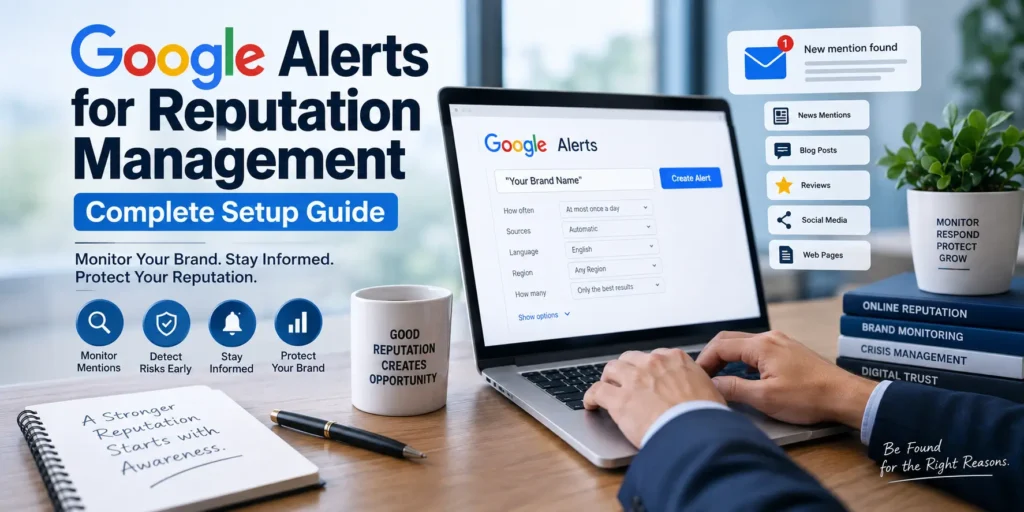
Google Alerts is a free Google service that sends email notifications when new results matching a topic appear in Google Search. Google allows users to customize settings such as notification frequency, source types, language, region, and the number of results included.
For reputation monitoring, this means you can create alerts for your personal name, company, brand, products, executives, and other reputation-sensitive terms.
For example, a business owner could monitor:
"Company Name""CEO Name""Company Name" review"Company Name" complaint"Company Name" lawsuit"Company Name" scam
The goal is simple: find potentially important mentions early enough to evaluate and respond appropriately.
Why Google Alerts Matter for Reputation Management
Reputation problems rarely begin with a dramatic crisis. Sometimes they start with one blog post, review, social discussion, or news mention that receives little attention at first.
Early awareness gives you more time to investigate what happened and decide whether action is necessary.
For example, suppose a real estate company discovers that a website has published an inaccurate article about one of its agents. If the company notices the article early, it can review the claim, gather supporting information, contact the publisher where appropriate, and monitor how the page develops in search.
That is much better than discovering the problem months later after the page has accumulated links, visibility, and additional references.
Google itself recommends creating an alert by entering a topic into Google Alerts, adjusting the available options, and selecting Create Alert.
How to Set Up Google Alerts for Reputation Management
Setting up an alert takes only a few minutes, but the quality of your search terms determines how useful the notifications will be.
Step 1: Go to Google Alerts
Open Google’s Alerts service while signed into the Google account where you want to receive notifications.
Enter the name, phrase, or topic you want to monitor.
Google Alerts Help: Create an Alert
Step 2: Start With Your Exact Name
If you are monitoring a personal reputation, begin with your exact name in quotation marks.
For example:
"John Smith"
Quotation marks help make the query more specific rather than monitoring every page containing the individual words separately.
For a company:
"ABC Construction"
For a product:
"Product Name"
Step 3: Add Reputation-Sensitive Variations
Your name or brand may appear in different formats.
Consider creating separate alerts for:
"Full Name""First Name Last Name""Company Name""CompanyName""Company Name" CEO"Company Name" review"Company Name" complaint
If your name has common misspellings, monitoring important variations can also be useful.
Step 4: Use “Show Options”
Google provides options for changing how frequently you receive alerts, the types of sites included, language, region, and the number of results.
For a reputation-sensitive term, you might choose more frequent notifications when the situation is active.
For routine monitoring, a daily digest can be less distracting.
Step 5: Create the Alert
Review your settings and click Create Alert.
You can later edit or delete alerts from your Google Alerts dashboard. Google also notes that if alerts are not arriving, users should check the correct Google account, alert settings, and email spam folder.
What Keywords Should You Monitor?
The strongest monitoring strategy does not depend on one alert.
Instead, build a small keyword portfolio based on the people, brands, and issues that matter to your reputation.
Brand Monitoring
Monitor your:
- Company name
- Brand name
- Product names
- Service names
- Website name
- Common abbreviations
Executive Monitoring
For CEOs and executives, consider:
"Full Name""Full Name" CEO"Full Name" company"Full Name" interview"Full Name" lawsuit"Full Name" allegations
Avoid creating dozens of unnecessary alerts. Focus on terms that could realistically affect professional credibility.
Reputation Risk Terms
Depending on your industry, you may monitor combinations such as:
"Brand Name" complaint"Brand Name" fraud"Brand Name" lawsuit"Brand Name" scam"Brand Name" review"Brand Name" controversy
These terms should be used for monitoring, not for assuming that a person or business is actually involved in wrongdoing.
Google Alerts for CEOs and Personal Brands
Executives face a unique reputation challenge because their personal and professional identities are often connected.
A negative article about a CEO can affect perceptions of the company, while a business controversy can become associated with the executive personally.
That makes ongoing monitoring particularly important.
A CEO can use separate alerts for their name, company, major initiatives, interviews, publications, and reputation-sensitive topics.
For more comprehensive executive protection, however, Google Alerts should be combined with a broader CEO Reputation Management strategy.
You can explore our CEO Reputation Management services for a more structured approach to protecting executive visibility and credibility.
Real Example: A Reputation Alert in Practice
Imagine a doctor named Dr. Sarah Miller discovers that a website has published an article containing inaccurate information about her professional background.
Her monitoring system produces an alert for "Sarah Miller".
Instead of immediately responding publicly, she could:
- Open the original page.
- Verify whether the information is actually inaccurate.
- Save the URL and screenshots.
- Identify the publisher.
- Determine whether the page violates a policy or contains a factual error.
- Consult appropriate legal or professional advisers if necessary.
- Contact the publisher when appropriate.
- Monitor whether the story spreads elsewhere.
If the page remains visible in search, a broader reputation strategy may be required.
The important lesson is that monitoring creates awareness; it does not automatically resolve the underlying reputation problem.
Google Alerts vs. Professional Reputation Monitoring
Google Alerts is useful, but it has limitations.
A reputation management program may need to look beyond Google’s indexed web results and examine reviews, social platforms, news coverage, forums, business listings, and other sources.
HubSpot’s current guidance on brand monitoring similarly describes Google Alerts as a useful baseline layer while noting that broader monitoring may be needed for social media, reviews, forums, podcasts, and AI-generated answers.
| Capability | Google Alerts | Professional Monitoring |
|---|---|---|
| Brand mentions | Yes | Yes |
| Email notifications | Yes | Usually |
| Search monitoring | Yes | Yes |
| Review monitoring | Limited | Yes |
| Social monitoring | Limited | Yes |
| Sentiment analysis | No | Often available |
| Competitor monitoring | Basic | Advanced |
| Crisis response | No | Yes |
| Search suppression | No | Yes |
| Reputation strategy | No | Yes |
Google Alerts is therefore best viewed as a first-line monitoring tool, not the complete solution.
How to Respond to a Negative Mention
Receiving an alert does not mean you should immediately respond.
First, determine what you are looking at.
1. Verify the Claim
Read the entire page rather than reacting to the headline or search snippet.
A critical opinion is not necessarily false information, and an unfavorable review is not automatically defamatory.
2. Assess the Potential Impact
Ask:
- Is the page ranking for your name?
- Is the publisher authoritative?
- Is the information factually incorrect?
- Is the page receiving significant attention?
- Could it affect customers or professional opportunities?
3. Choose the Appropriate Response
Depending on the circumstances, your options may include:
- Requesting a factual correction
- Reporting policy violations
- Responding professionally
- Seeking legal advice
- Publishing accurate supporting information
- Strengthening positive search results
- Implementing reputation management strategies
A measured response is usually better than a public argument.
Common Google Alerts Mistakes
Creating Only One Alert
One alert for your company name may miss important variations.
Create a small group of strategically selected alerts instead.
Monitoring Only Your Company
Executives, products, major services, and important brand variations can also affect reputation.
Treating Every Alert as a Crisis
A mention does not automatically require action.
Classify alerts as positive, neutral, negative, or potentially harmful before deciding what to do.
Ignoring False Positives
Some alerts will be irrelevant. Refine your terms rather than allowing your inbox to become overloaded.
Assuming Google Alerts Finds Everything
It doesn’t.
No single monitoring tool captures every online conversation, particularly across social networks, private communities, reviews, and emerging AI search environments.
Best Practices for Google Alerts for Reputation Management
A practical monitoring system should be consistent rather than complicated.
Use a Monitoring Spreadsheet
For important reputation issues, record:
- Date discovered
- URL
- Source
- Mention type
- Sentiment
- Potential impact
- Action taken
- Follow-up date
This creates a simple history of reputation events.
Review Alerts Regularly
Monitoring only works when someone actually reviews the notifications.
For a normal business, a daily review may be sufficient. During a crisis or major public event, more frequent review may be appropriate.
Separate Monitoring From Response
The person receiving an alert does not necessarily need to decide what to do.
For serious issues, create an internal process for escalating potentially damaging mentions to leadership, communications, legal, or reputation specialists.
Google Alerts and AI Search Visibility
Reputation monitoring is changing as people increasingly use AI-powered answer engines alongside traditional search.
A brand can now be discussed in a review, forum, news article, or other source and later become part of the information surfaced by AI systems.
Google Alerts does not provide a complete view of this environment.
HubSpot’s current AEO guidance describes AI visibility monitoring as a separate process involving brand mentions, prompts, citations, and the sources used in answer-engine responses.
That means modern reputation management should consider two questions:
- What are people finding when they search for my name or company?
- What information may influence AI-generated answers about my brand?
For businesses that depend heavily on executive credibility or public trust, this distinction is becoming increasingly important.
Common Reputation Management Situations
Google Alerts can be especially useful as an early-warning mechanism for:
- Business owners
- CEOs
- Entrepreneurs
- Doctors
- Lawyers
- Real estate professionals
- Agency owners
- Personal brands
- Public-facing professionals
For example, a law firm may monitor its brand and partners. A doctor may track their professional name and practice. A real estate professional may monitor their name, brokerage, and property-related brand mentions.
The specific terms change, but the principle remains the same: know what is being published about you before your audience tells you about it.
When Google Alerts Is Not Enough
If a serious reputation issue has already appeared, simply creating an alert will not fix it.
You may need a broader strategy involving content analysis, publisher outreach, search visibility work, review management, digital PR, monitoring, and long-term reputation protection.
For organizations dealing with sophisticated reputation challenges, our Reputation Management Services are designed to address the broader digital picture rather than simply track mentions.
If the issue involves a fast-moving public incident, our Crisis Reputation Management service can provide a more structured response strategy.
For personal brands, Personal Reputation Management can help address reputation challenges that extend beyond a single search result.
How Your Reputation Agency Can Help
Google Alerts can tell you that something changed. The next question is what to do about it.
Your Reputation Agency helps businesses, executives, entrepreneurs, professionals, and personal brands understand and manage their digital reputation through tailored strategies.
Depending on the situation, professional support may include:
- Reputation audits
- Search result analysis
- Reputation monitoring
- Negative content strategy
- Search suppression
- Executive reputation protection
- Review management
- Crisis response
- Digital content strategy
- Brand authority development
Our Reputation Management Agency approach is built around the specific circumstances of each client rather than generic promises.
For more complex situations, you can also review our Reputation Management Consultants and Expert Reputation Management resources.
Featured Snippet Answer
Google Alerts for Reputation Management is a free monitoring method that sends notifications when new Google Search results match selected names, brands, or keywords. It helps businesses and individuals discover online mentions early, but it does not replace comprehensive reputation monitoring, crisis response, content removal, or professional reputation management.
Don’t Wait Until a Reputation Problem Becomes a Crisis
A Google Alert is useful when it arrives early enough for you to act.
If you’ve received an alert about negative news, a damaging review, inaccurate information, or a potentially serious reputation issue, don’t react impulsively. First understand what the content says, where it appears, how visible it is, and what options are realistically available.
Your Reputation Agency can help you evaluate the situation and develop a professional strategy based on your goals.
Whether you need ongoing monitoring, executive protection, search visibility management, or broader reputation recovery, our team can help you move from simply watching your reputation to actively protecting it.
Contact Your Reputation Agency for a confidential consultation and discuss the right reputation management strategy for your business or personal brand.
Frequently Asked Questions
1. What is Google Alerts for Reputation Management?
It is the use of Google Alerts to monitor online mentions of a person’s name, company, brand, product, or reputation-sensitive keywords. Google sends email notifications when matching new results are found.
2. Is Google Alerts free?
Yes. Google provides Google Alerts as a free notification service. You can create alerts for topics and customize notification settings.
3. How often should I check Google Alerts?
For routine monitoring, a daily review can work well. During a reputation crisis or major public event, more frequent monitoring may be appropriate.
4. Can Google Alerts detect negative reviews?
It may detect some publicly indexed review pages, but it should not be treated as a dedicated review-monitoring system. Important reviews may require separate monitoring.
5. Can Google Alerts remove negative content?
No. Google Alerts is a notification service. It tells you about matching search results but does not remove the underlying content.
6. Should CEOs use Google Alerts?
Yes. CEOs and other public-facing executives can use alerts to monitor their names, companies, interviews, news coverage, and reputation-sensitive topics.
For broader protection, however, executives may benefit from a dedicated Executive Reputation Management strategy.
7. Does Google Alerts monitor social media?
Google Alerts should not be considered a comprehensive social media monitoring platform. A broader monitoring stack may be necessary to track conversations across social networks, forums, review sites, and other channels.
8. Can Google Alerts help with AI reputation management?
It can provide useful information about new web content, but it does not comprehensively monitor how your brand appears in AI-generated answers. AI visibility requires additional monitoring and analysis.
9. How many Google Alerts should I create?
There is no universal number. Start with your name or company, important variations, executives, products, and a small number of high-value reputation terms. Add alerts only when they provide useful information.
10. When should I hire a reputation management agency?
Consider professional support when negative content is ranking prominently, false information is spreading, reviews are affecting trust, a crisis is developing, or you lack the resources to monitor and respond consistently.
Conclusion
Google Alerts for Reputation Management is one of the simplest ways to become more aware of what is being published about your name, company, executives, and brand.
But awareness is only the beginning.
A strong reputation strategy combines monitoring with thoughtful analysis, accurate information, proactive content development, search optimization, review management, and appropriate crisis response. Google recommends creating helpful, reliable, people-first content rather than producing material primarily to manipulate search rankings.
For that reason, the goal should never be to flood the internet with content simply to push something down. The stronger approach is to build a credible digital presence that genuinely helps your audience and accurately represents who you are.
If Google Alerts shows you something concerning, don’t panic and don’t ignore it. Investigate the source, evaluate the potential impact, and choose a response based on the facts.
And when the situation goes beyond simple monitoring, professional reputation management can provide the strategy, experience, and ongoing support needed to protect your digital reputation.
Want to learn more about our client experience? Read our Trustpilot reviews to see feedback from clients who have worked with Your Reputation Agency.