Quick answer: remove your name from BeenVerified
Remove your name from BeenVerified by locating the exact profile, saving its URL, using the official opt-out process, completing verification, and checking the listing after processing.
Request search refreshes after removal, correct inaccurate public sources, save confirmations, and recheck regularly because data can be repopulated.
Introduction
If your name, address, phone number, relatives, or other personal information appears on BeenVerified, you may understandably want greater control over what strangers can find about you online. Learning How to Remove Your Name from BeenVerified is an important first step toward reducing your exposure on people-search websites.
BeenVerified is part of a broader ecosystem of people-search and data-broker services that compile information from different sources. The Federal Trade Commission explains that people-search sites can collect information from public records, social media, and other data sources, then make reports available to people searching for someone.
The important point is that removing a profile from one people-search website does not necessarily erase the underlying information from public records or every other website.
That is why a complete privacy and reputation strategy should go beyond a single opt-out request.
In this guide, we will explain how the BeenVerified removal process generally works, what to expect afterward, common mistakes to avoid, and how professional reputation management can help when your online exposure extends beyond BeenVerified.
Table of Contents
- What Is BeenVerified?
- Why Remove Your Name from BeenVerified?
- How to Remove Your Name from BeenVerified
- What Happens After You Submit an Opt-Out Request?
- Why Your Information May Reappear
- BeenVerified Removal vs. Google Search Removal
- Real-World Example
- Common Mistakes to Avoid
- Best Practices for Protecting Your Online Identity
- When Professional Reputation Management Makes Sense
- Frequently Asked Questions
- Conclusion
- Strong CTA
What Is BeenVerified?
BeenVerified is a people-search service that provides information about individuals through searchable reports.
People-search websites can aggregate information from multiple sources. Depending on the person and available data, a profile may contain information such as:
- Name
- Age
- Current or previous addresses
- Phone numbers
- Possible relatives
- Associated individuals
- Property information
- Public-record information
- Other publicly available details
The FTC describes people-search sites as a type of data broker and notes that information can be compiled from public records, social media profiles, and other data sources.
This creates a practical privacy problem.
You may never have intentionally submitted your information to BeenVerified, yet a profile can still exist.
For professionals, executives, doctors, lawyers, business owners, and public-facing individuals, the issue can also become a reputation concern.
Someone may search your name after seeing your business website, LinkedIn profile, Google Business Profile, or social media account.
If personal information appears alongside your professional identity, it can make your online presence feel less controlled.
Why Should You Remove Your Name from BeenVerified?
Privacy is the most obvious reason, but there are several other considerations.
1. Reduce Unnecessary Personal Exposure
If your home address, phone number, relatives, or other personal details appear publicly, removing a people-search profile can reduce the amount of information readily available through that particular service.
2. Protect Your Professional Image
For executives, entrepreneurs, doctors, lawyers, real estate professionals, and personal brands, online search results contribute to the overall impression people form about you.
A prospective client may search your name before contacting you.
3. Reduce Information Available to Strangers
People-search websites make it easier for someone to connect pieces of information that might otherwise be scattered across different sources.
Reducing unnecessary exposure can be a sensible privacy measure.
4. Take Control of Your Digital Footprint
Your online reputation is not limited to social media or Google reviews.
It also includes third-party databases, directories, publications, profiles, and people-search websites.
A broader Reputation Monitoring strategy can help you identify where your name appears and whether new information is being published.
How to Remove Your Name from BeenVerified
The exact interface can change over time, so always follow the current instructions shown on BeenVerified’s own website.
Recent 2026 opt-out guides report that BeenVerified provides a self-service opt-out process through its website. The current flow generally involves finding your record, selecting the appropriate listing, providing an email address for verification, and confirming the request through email.
Here is the practical process.
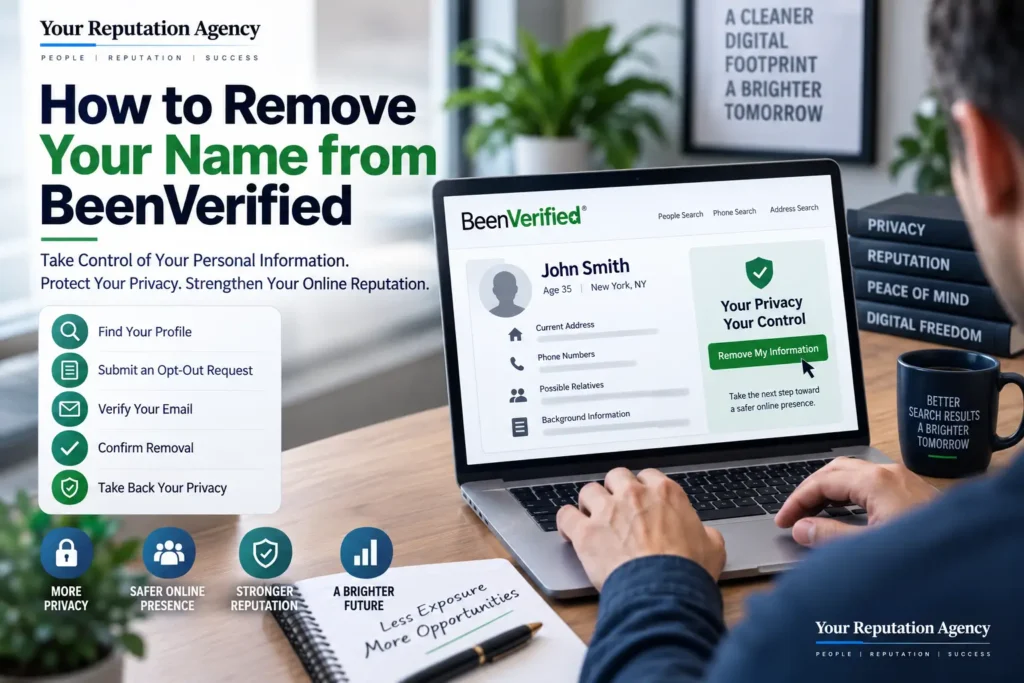
Step 1: Find Your BeenVerified Profile
Go to BeenVerified and search for your name.
Try variations that may be associated with you, such as:
- First and last name
- First, middle, and last name
- Name + state
- Name + city
- Previous name variations
- Common spelling variations
If you have a common name, pay close attention to the location and other identifying information.
Do not assume the first result is yours.
Step 2: Confirm That the Profile Belongs to You
Before requesting removal, compare the information displayed on the profile.
Look for details such as:
- Age range
- Current or previous locations
- Relatives
- Associated addresses
- Other identifying information
This helps prevent you from accidentally selecting another person with a similar name.
Step 3: Locate the Opt-Out Option
BeenVerified’s interface and terminology can change.
Current guides report that users can reach the opt-out process through the site’s privacy or “Do Not Sell or Share My Personal Information” pathway.
Follow the current first-party instructions rather than relying on an old screenshot or outdated tutorial.
Step 4: Select the Correct Record
Once you locate your profile, follow the site’s instructions to initiate the removal or opt-out request.
You may be asked to complete a verification step.
Only submit information necessary to complete the request.
Step 5: Verify Your Email
Recent guides indicate that BeenVerified’s process can require an email verification step before the opt-out request is completed.
Check your inbox and spam folder.
If BeenVerified sends a verification email, complete the confirmation promptly.
Step 6: Save Your Confirmation
Keep a record of:
- The profile URL
- Date of your request
- Confirmation email
- Screenshots, if appropriate
- Any reference or confirmation information
This becomes useful if you need to follow up later.
Step 7: Check Again
Do not assume that submitting an opt-out request means your work is finished forever.
Search BeenVerified again after the stated processing period and confirm whether your listing is still visible.
The FTC specifically warns that information can reappear on people-search sites, particularly when underlying public records change.
What Happens After You Submit an Opt-Out Request?
An opt-out generally affects the listing on the particular people-search service.
It does not necessarily remove the underlying source information from the internet.
This distinction is extremely important.
For example, if a people-search site obtained information from a public record, removing the people-search profile does not automatically erase that public record.
The FTC explains that opting out of people-search sites does not delete information from public records, and information can sometimes reappear later.
That means privacy protection should be treated as an ongoing process.
Why Your Information May Reappear
There are several possible reasons.
Public Records Change
A people-search service may update its database using information from public sources.
Data Is Aggregated Again
Your information may be collected from another source and added back to a profile.
Multiple Profiles Exist
You may have more than one listing because of:
- Name variations
- Previous addresses
- Different phone numbers
- Duplicate records
- Similar identities
Other People-Search Sites Still Have Your Information
Removing yourself from BeenVerified does not automatically remove your information from every other people-search website.
The FTC recommends periodically checking people-search sites and submitting new opt-out requests when information appears again.
BeenVerified Removal vs. Google Search Removal
These are two different problems.
| Problem | Appropriate Action |
|---|---|
| Your profile appears on BeenVerified | Submit a BeenVerified opt-out request |
| Your personal information appears on another data broker | Use that site’s removal process |
| Your home address or phone number appears in Google Search | Review Google’s personal-information removal options |
| Information remains on the original website | Contact the website owner where appropriate |
| Negative content about you ranks in Google | Consider reputation management and appropriate removal/correction options |
| Information appears across many websites | Consider a broader privacy and reputation strategy |
Google explains that eligible personal information such as addresses, phone numbers, and email addresses may be eligible for removal from Google Search under its applicable policies. However, Google emphasizes that removing a result from Search does not necessarily remove the information from the website hosting it.
Microsoft similarly notes that Bing removal is limited to specific circumstances and that removing a search result does not necessarily remove the information from the original website.
So, if your goal is broader than BeenVerified, you need to address the underlying sources as well as search visibility.
Real Example: A Business Owner Finds His Home Address Online
Imagine a business owner named Michael searches his name before meeting a potential corporate client.
He discovers:
- His professional website
- LinkedIn profile
- Several positive business mentions
- A BeenVerified profile
- An old directory listing
- His previous address
- A second people-search profile
Michael initially thinks that removing the BeenVerified listing will solve everything.
It won’t.
He submits the BeenVerified opt-out request and confirms it through email.
Then he audits the rest of his online presence.
He discovers that several other websites contain similar information.
A more complete strategy would involve:
- Removing or suppressing eligible people-search profiles.
- Reviewing Google’s personal-information removal options.
- Checking Bing.
- Monitoring other data brokers.
- Auditing branded search results.
- Reviewing professional profiles.
- Strengthening authoritative business and personal assets.
- Monitoring for future reappearance.
This is the difference between completing one opt-out and managing a broader digital footprint.
If negative or unwanted information is also appearing in Google, our guide on How to Protect Your Brand Name in Google Search provides a broader reputation-focused framework.
Common Mistakes When Removing Your Name from BeenVerified
Mistake 1: Assuming One Opt-Out Removes Everything
It doesn’t.
People-search websites are part of a much larger data ecosystem.
Mistake 2: Using Outdated Instructions
Opt-out interfaces can change.
A guide published several years ago may show buttons or URLs that no longer exist.
Always verify the current process.
Mistake 3: Not Checking Name Variations
A second profile may exist under a middle initial, previous address, or another variation.
Mistake 4: Stopping After the First Removal
Your information can reappear.
The FTC recommends periodic checking because data may return to people-search sites.
Mistake 5: Ignoring Google
Removing a BeenVerified profile does not automatically remove every Google result associated with your name.
Mistake 6: Forgetting Other Search Engines
Google is not the only search engine that matters.
Microsoft explains that Bing has its own policies and processes for limited categories of search-result removal.
Mistake 7: Confusing Privacy With Reputation
Removing an address from a people-search site is a privacy task.
Removing or managing a damaging article is a reputation-management task.
They can overlap, but they are not the same thing.
Best Practices for Protecting Your Online Identity
Search Yourself Regularly
Search your:
- Full name
- Business name
- Name + location
- Name + reviews
- Name + complaints
- Name + company
For an automated approach, see How to Monitor Your Name on Google Automatically.
Create a Reputation Monitoring Routine
Track important search results, new mentions, reviews, and third-party pages.
Our guide on Why Business Owners Panic After Seeing Their Name Online explains why discovering an unexpected search result can feel alarming—and why having a monitoring strategy matters.
Audit Your Entire Digital Footprint
Don’t look only at BeenVerified.
Check:
- People-search websites
- Data brokers
- Business directories
- Social media
- News websites
- Forums
- Review platforms
- Search engines
If your business reputation is also affected, our Online Presence & Local SEO for Small Businesses resource can help you think about the broader digital presence.
Protect Your Professional Identity
For executives and public-facing professionals, personal information can appear alongside professional search results.
A broader Personal Reputation Management strategy may be appropriate when privacy concerns and reputation concerns overlap.
Expert Tips From an ORM Perspective
Think Beyond Deletion
Not everything online can be deleted.
Some information may be legally published, part of public records, or hosted by a publisher that is not obligated to remove it.
When removal isn’t realistic, the strategy may shift toward correction, privacy protection, search visibility, and stronger authoritative content.
Separate Private Information From Negative Content
These require different approaches.
For example:
Home address: privacy/removal issue.
False business allegation: potential reputation issue.
Legitimate critical article: reputation-management and communication issue.
Old professional profile: accuracy and search-visibility issue.
Understanding the difference helps you choose the right solution.
Monitor AI Search Too
Your online reputation is no longer limited to traditional search results.
HubSpot’s current research notes that brand mentions can appear across news, social media, review sites, forums, podcasts, and AI-generated answers from systems such as ChatGPT, Gemini, and Perplexity.
That means reputation monitoring increasingly needs to consider how information about you is represented across multiple search and answer environments.
Don’t Create Fake Positive Content
Reputation management should be based on accurate, useful, and credible information.
Creating fake profiles, fabricated reviews, misleading articles, or deceptive backlinks can create additional problems.
Your goal should be a stronger digital footprint—not an artificial one.
When Professional Reputation Management Makes Sense
A single BeenVerified opt-out may be enough if your only concern is one profile.
However, you may need a broader strategy if:
- Your name appears across many data brokers.
- Negative articles rank for your name.
- False information is circulating.
- Your business name has damaging search results.
- Your executive profile is attracting unwanted attention.
- Reviews are affecting your business reputation.
- Your personal and professional identities are strongly connected.
- You have experienced a reputation crisis.
- You need continuous monitoring.
YourReputation.agency can help evaluate the wider picture.
Our Online Reputation Protection Services are designed for individuals and organizations that need a proactive approach to protecting their digital reputation.
For companies, our Reputation Management Agency services can address broader brand and search-reputation challenges.
Businesses looking for ongoing strategic support can also explore our Reputation Management Consultants and Reputation Management Firm resources.
For a wider overview, see our Reputation Management services.
Frequently Asked Questions
1. How to Remove Your Name from BeenVerified?
How to Remove Your Name from BeenVerified generally involves finding your profile on BeenVerified, selecting the correct record, following the site’s current opt-out process, providing an email for verification if requested, and confirming the request. Current 2026 guides report that BeenVerified offers a free self-service opt-out process, although the interface may change.
2. Is it free to remove my name from BeenVerified?
Current guides report that BeenVerified’s self-service opt-out process is free. Always use the current first-party process and verify the instructions shown on BeenVerified rather than relying solely on third-party guides.
3. How long does BeenVerified removal take?
Processing times can vary. Recent third-party guides report that removal may take anywhere from approximately 24 hours to several days, depending on the current process. Check the confirmation or instructions provided by BeenVerified for the most relevant timeframe.
4. Does removing my BeenVerified profile remove my information from Google?
Not necessarily. Removing a profile from BeenVerified and removing a result from Google are separate processes. Google has its own policies for eligible personal-information removal requests.
5. Will removing my name from BeenVerified delete public records?
No. An opt-out from a people-search website does not generally erase the underlying public records from government or other original sources. The FTC specifically notes this limitation.
6. Can my BeenVerified information come back after removal?
Yes, it can. The FTC warns that information may reappear on people-search sites, particularly when underlying public records change. Periodic monitoring is therefore important.
7. Should I remove my name from other people-search websites too?
If privacy is your goal, yes. Removing one profile does not automatically remove information from other data brokers or people-search services. The FTC recommends checking multiple people-search sites and submitting opt-out requests where necessary.
8. Can Your Reputation Agency remove my BeenVerified profile?
Our role can include helping clients understand and manage broader online reputation and privacy-related exposure. Because third-party websites control their own databases and removal policies, no ethical reputation professional should guarantee that every record can be permanently removed.
We can instead assess the broader digital footprint and identify appropriate actions.
9. What if negative information appears alongside my BeenVerified profile?
That becomes a broader reputation issue. Depending on the source, appropriate strategies may include correction requests, platform reporting, publisher outreach, search-result management, content development, or other reputation-management techniques.
For example, 7 Things That Happen When You Google Your Name and Find Negative Results explains why negative search results can have a disproportionate effect on how people perceive you.
10. Can removing personal information improve my online reputation?
It can reduce unnecessary exposure, but privacy removal and reputation improvement are different objectives. If damaging content continues to rank for your name, you may need a broader reputation strategy.
Our Reputation Management Services can help organizations and individuals evaluate those broader challenges.
Related Resources
If you’re working on a larger personal privacy or reputation project, these guides may also be useful:
- How to Protect Your Brand Name in Google Search
- Why Does My Business Name Show Negative Results on Google? Expert ORM Guide
- Why Business Owners Panic After Seeing Their Name Online
- 7 Things That Happen When You Google Your Name and Find Negative Results
- Removing Name From Radaris: 7 Brutal Steps to Reclaim Privacy
For executives, our CEO Reputation Management and Executive Reputation Management services address reputation challenges involving senior professionals.
For specialists and public-facing professionals, Expert Reputation Management can provide a more focused approach.
If your online reputation has become a serious business issue, Crisis Reputation Management may be more appropriate than a basic privacy cleanup.
For businesses that need ongoing support, you can also explore Social Media Reputation Management, Wikipedia Consulting & Reputation Management, and our broader Reputation Management Services.
Conclusion
Learning How to Remove Your Name from BeenVerified can be a useful step toward taking greater control of your personal information online.
The basic process is straightforward: find your profile, verify that it belongs to you, follow BeenVerified’s current opt-out process, confirm your request, and check again afterward.
But that is only one part of digital privacy.
Your information may exist on other people-search websites, public records, directories, social platforms, and search engines. The FTC specifically recommends periodic monitoring because information can reappear.
At the same time, removing personal information does not automatically resolve negative search results, inaccurate articles, unwanted reviews, or other reputation problems.
That is where privacy management and online reputation management intersect.
A stronger strategy looks at the complete picture—not just one website.
Take Control of Your Online Reputation
Your name is part of your professional identity.
If you are a business owner, CEO, entrepreneur, doctor, lawyer, real estate professional, or public-facing expert, what people discover about you online can influence trust before you ever speak with them.
YourReputation.agency helps individuals and organizations understand, monitor, and strategically improve their online reputation.
If you’ve discovered your personal information on BeenVerified and are also concerned about what appears when people Google your name, don’t treat each result as an isolated problem.
Let our reputation specialists assess the bigger picture.
Contact Us for a professional reputation assessment and discover what can realistically be done to strengthen your online presence.
You can also review independent feedback about YourReputation.agency on Trustpilot.
Your digital footprint is already shaping your reputation. The right time to understand and protect it is before the next person searches your name.