Quick answer: TruePeopleSearch opt out
Opt out of TruePeopleSearch by locating the exact profile, saving its URL and exposed fields, using the official removal page, and completing required verification.
Confirm the listing and Google result after processing, correct source records, save confirmation evidence, and recheck regularly because data may return.
Introduction
If you have searched your name online and discovered your home address, phone number, previous locations, relatives, or other personal details on a people-search website, you are not alone. Understanding How to Opt Out of TruePeopleSearch can be an important step toward reducing the amount of personal information publicly accessible online.
TruePeopleSearch is part of a broader category of people-search websites and data brokers that compile information from multiple sources and make searchable profiles available online. The Federal Trade Commission explains that people-search sites can compile information from public records, other data brokers, and publicly available sources into detailed reports.
The important point is that removing your information from one website does not necessarily remove it from the internet entirely. Your information may exist on other people-search websites, public records, search engines, or related profiles.
This guide explains how the TruePeopleSearch opt-out process generally works, what to do after submitting a request, why information can reappear, and how a broader online privacy and reputation strategy can help.
What Is TruePeopleSearch?
TruePeopleSearch is a people-search website that allows users to search for information associated with individuals.
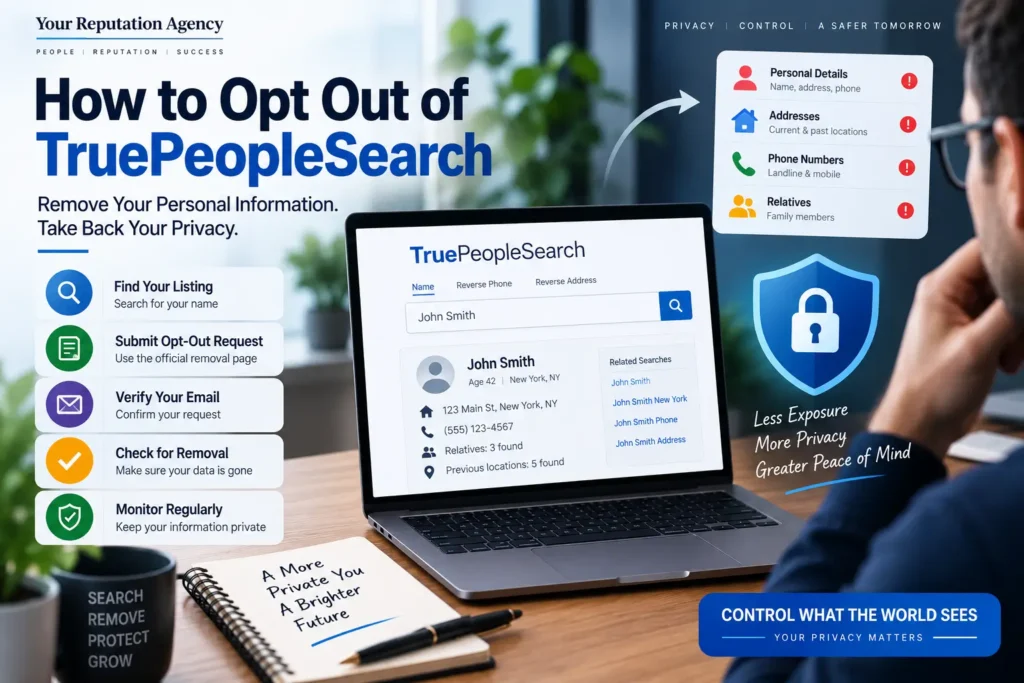
Depending on the available data, people-search profiles can contain information such as:
- Full names
- Current or previous addresses
- Phone numbers
- Approximate age
- Relatives or associates
- Previous locations
- Other publicly available information
The Federal Trade Commission describes people-search sites as a type of data broker. These companies can collect information from public records, social media, and other data sources and combine it into searchable reports.
That aggregation is what makes people-search websites different from simply finding one public record.
Information that might appear in separate databases can potentially be brought together into one searchable profile.
For someone concerned about privacy, personal safety, identity exposure, or professional reputation, that can be uncomfortable.
Why You May Want to Opt Out
There are several legitimate reasons someone may want to remove their information from TruePeopleSearch.
Privacy
You may not want strangers to easily locate your current or previous address.
Personal Safety
People who have experienced stalking, harassment, domestic abuse, or other safety concerns may have especially strong reasons to reduce the public availability of location information.
The FTC specifically recognizes that some people may not want people-search websites to expose where they live or information about family members.
Professional Reputation
Business owners, CEOs, doctors, lawyers, executives, and public-facing professionals may want greater control over what prospective clients or partners can discover when searching their names.
Reduced Data Exposure
Even if the information is technically available through public sources, having it consolidated into an easily searchable profile can create additional privacy concerns.
Search Reputation
A people-search profile can sometimes appear in Google or other search engines for branded or personal-name searches.
This means data removal can be part of a broader reputation strategy rather than simply a privacy task.
How to Opt Out of TruePeopleSearch
The TruePeopleSearch interface can change over time, so always follow the instructions displayed on its current removal page. Current third-party guides describe the process as a free, email-verified removal workflow.
Step 1: Find Your TruePeopleSearch Listing
Start by searching for yourself on TruePeopleSearch.
Use identifying information such as:
- First and last name
- City
- State
- Previous location, if necessary
You may find several people with the same name.
Do not submit the wrong profile.
Before requesting removal, compare the information carefully to confirm that the listing actually belongs to you.
Step 2: Open the TruePeopleSearch Removal Page
Current removal guides identify the main removal page as:
You may also be able to reach the removal process through the site’s footer or privacy-related links.
Because websites change their navigation, the exact wording or location of the link may differ from older tutorials.
Step 3: Enter an Accessible Email Address
The current opt-out process generally requires an email address for verification.
Use an email account you can access immediately.
After submitting the initial information, you may be asked to complete an anti-bot or security verification before continuing.
Current guides report that email verification is part of the removal workflow.
Step 4: Search for Your Profile
The removal process may direct you back to a search interface.
Enter identifying information such as:
- First name
- Last name
- City
- State
Then review the results.
If you have lived in multiple locations or have common identifying information, you may see multiple records.
Step 5: Confirm the Correct Record
Open the profile that matches you.
Compare information such as:
- Name
- Location
- Previous locations
- Phone information
- Relatives or associates
- Other identifying details
This step matters because removing another person’s profile would be inappropriate.
Step 6: Submit the Removal Request
Current opt-out guides describe a “Remove This Record” or similarly worded option on the profile. Select the appropriate removal option and follow the instructions shown by TruePeopleSearch.
If the interface uses different wording, follow the current on-screen instructions rather than relying on an outdated screenshot or tutorial.
Step 7: Verify Your Email
Watch your inbox for an email from TruePeopleSearch.
The current process commonly requires clicking a verification link to finalize the removal request.
Also check your spam or junk folder if you do not see the message shortly after submitting the request.
Do not assume the process is complete until you have followed the required verification steps.
Step 8: Confirm That Your Listing Is Gone
After the request has been processed, search TruePeopleSearch again.
Check the same identifying information you used previously.
If you had multiple profiles, check each one.
Some current guides report removal in roughly 72 hours, while other sources caution that processing times can vary. Treat these timeframes as estimates rather than guarantees.
What Happens After You Submit an Opt-Out Request?
A successful opt-out can reduce the availability of your existing information on the specific people-search site.
However, it is important to understand what an opt-out does not necessarily accomplish.
According to the FTC, opting out of people-search websites does not remove information from public records. Information can also appear in reports associated with relatives, neighbors, or associates, and information may reappear if underlying data changes.
That means privacy protection should be treated as an ongoing process.
Think of It as Maintenance
A practical process is:
Search → Identify → Opt Out → Verify → Recheck → Repeat
This is especially important if you have moved, changed phone numbers, changed your name, or have information distributed across many data sources.
What If Your Information Appears Again?
One of the most frustrating parts of data-broker removal is reappearance.
A successful removal does not necessarily prevent information from being collected again from other sources.
Search Engine Journal recently highlighted the broader problem with data-broker content: opt-outs can be tedious and information can reappear when brokers refresh their datasets.
If your information comes back, repeat the removal process.
Then look beyond TruePeopleSearch.
Check other people-search and data-broker websites for the same information.
For example, you may also want to review our related guides:
- How to Remove Your Information from FastPeopleSearch: Complete Opt-Out Guide
- How to Remove Your Information from USSearch: Complete Opt-Out Guide
- How to Remove Your Information from Intelius: Complete Opt-Out Guide
- How to Remove Your Information from PeopleFinders
- Removing Name From Radaris: 7 Brutal Steps to Reclaim Privacy
The goal is to understand your broader exposure rather than treating one website as the entire problem.
Does TruePeopleSearch Removal Delete Public Records?
No.
This distinction is extremely important.
Removing a profile from a people-search website does not necessarily delete the underlying public records from government databases or other original sources.
The FTC specifically notes that opting out of people-search sites does not remove your information from public records.
Think of it this way:
| Action | What It Can Do |
|---|---|
| TruePeopleSearch opt-out | Remove or suppress your profile from that site |
| Data broker opt-out | Reduce exposure on a specific broker |
| Google removal request | Remove qualifying results from Google Search |
| Source-page removal | Potentially remove information from the original website |
| Public-record change | Depends on the relevant government agency and applicable law |
Understanding the difference prevents unrealistic expectations.
Google and Bing Search Removal
Removing your profile from TruePeopleSearch and removing a Google result are two different processes.
Google currently provides Results about you, which can help users identify personal information such as phone numbers, home addresses, and email addresses appearing in Search and request removal when eligible.
Google also explains an important limitation: removing a result from Google Search does not necessarily remove the information from the original website.
So, if your TruePeopleSearch listing appears in Google, consider both sides:
Source: Can the information be removed from the website?
Search engine: Does the result qualify for Google’s removal process?
Bing also has policies allowing removal of certain sensitive personal information in limited circumstances. Microsoft emphasizes that removing a search result does not necessarily remove information from the original website.
For broader search visibility, our guide on How to Protect Your Brand Name in Google Search explains how privacy, SEO, and online reputation can intersect.
Real Example: Why One Opt-Out May Not Be Enough
Imagine a business owner named Sarah.
She searches her name and discovers:
- A TruePeopleSearch profile
- An old address on another people-search website
- A professional directory listing
- A social media profile
- An old article mentioning her previous business
- Several Google results containing her name
Sarah submits a TruePeopleSearch removal request.
A few days later, the profile disappears.
At first, it seems like the problem is solved.
But when she searches again several weeks later, another data-broker profile appears.
Why?
Because TruePeopleSearch was only one source.
The broader issue is data distribution.
Sarah therefore needs to:
- Identify the other sites publishing her information.
- Submit appropriate opt-out requests.
- Check Google Search.
- Review Bing Search.
- Monitor for new listings.
- Review professional and social profiles.
- Strengthen her overall digital footprint.
This is why data removal and reputation monitoring often work best as connected processes.
Common TruePeopleSearch Opt-Out Mistakes
Mistake 1: Choosing the Wrong Profile
Common names can produce multiple records.
Always verify the details before submitting a request.
Mistake 2: Forgetting Email Verification
Submitting the form may not be the final step.
Check your inbox and complete any verification process.
Mistake 3: Assuming One Removal Covers Every Website
It does not.
Each data broker generally has its own system and policies.
Mistake 4: Never Checking Again
Your information can reappear or surface elsewhere.
Periodic monitoring is important.
Mistake 5: Assuming Google Removal Deletes the Source
Google explains that Search removal does not necessarily remove the information from the originating webpage.
Mistake 6: Giving Too Much Information
Only provide information necessary for legitimate verification and follow the site’s current privacy instructions.
Mistake 7: Ignoring Your Wider Digital Footprint
Removing one people-search profile may not solve a broader privacy or reputation problem.
Best Practices for Protecting Your Personal Information
1. Audit Your Name Regularly
Search your:
- Full name
- Name + city
- Name + state
- Phone number
- Email address
- Business name
2. Use Google’s Monitoring Tools
Google’s Results about you can notify eligible users when matching personal information appears in Search.
3. Maintain a Removal Record
Keep a simple spreadsheet containing:
| Website | URL | Date Submitted | Status | Recheck Date |
|---|---|---|---|---|
| TruePeopleSearch | Profile URL | Date | Submitted/Removed | Date |
| Data Broker 2 | Profile URL | Date | Submitted/Removed | Date |
| Data Broker 3 | Profile URL | Date | Submitted/Removed | Date |
This makes repeated privacy maintenance much easier.
4. Review Your Public Profiles
Your personal information can also be exposed through social profiles, professional directories, business listings, and old websites.
5. Separate Privacy From Reputation
Not every search result is a privacy problem.
Some are reputation issues.
Others may be SEO problems.
Understanding the category helps determine the right solution.
Expert Tips: Think Beyond TruePeopleSearch
TruePeopleSearch is only one piece of a much larger online information ecosystem.
If your primary concern is privacy, focus on data-broker removal and exposure reduction.
If your concern is what potential customers, employers, investors, or partners see when searching your name, you may also need a broader reputation strategy.
Our Remove Personal Information from Data service can be relevant when your concern extends across multiple sources.
For ongoing visibility, Reputation Monitoring can help identify new mentions, search-result changes, and other reputation signals.
And if your concern involves a broader business footprint, Online Presence & Local SEO for Small Businesses can help connect local visibility with a stronger digital presence.
Data Removal vs. Reputation Management
| Data Removal | Reputation Management |
|---|---|
| Focuses on personal information | Focuses on overall digital perception |
| Targets data brokers and specific websites | Covers search, reviews, content, social profiles, and third-party sources |
| Often privacy-driven | Often trust and reputation-driven |
| Can involve opt-out requests | Can involve monitoring, SEO, content, and response strategies |
| May need repeated requests | Requires ongoing reputation monitoring |
| Does not necessarily change public records | Does not necessarily remove source content |
These approaches can overlap, but they are not the same service.
For businesses and public-facing professionals, a wider reputation strategy may be necessary.
YourReputation.agency provides Online Reputation Protection Services for individuals, professionals, executives, and businesses that need a more comprehensive approach.
When Should You Consider Professional Reputation Support?
Manual opt-outs can be reasonable when you only have one or two profiles to address.
However, the process becomes more complicated when you have:
- Multiple data-broker profiles
- Several addresses
- Multiple name variations
- Significant search visibility
- Negative search results
- Business and personal reputation concerns
- Executive-level visibility
- Repeated re-listing
- Online harassment or privacy concerns
A professional Reputation Management Agency can help evaluate the wider picture.
For business owners and senior leaders, CEO Reputation Management and Executive Reputation Management can address the connection between personal visibility and business reputation.
Professionals who rely heavily on their expertise and personal brand can also explore Expert Reputation Management or Personal Reputation Management.
Frequently Asked Questions
1. How to Opt Out of TruePeopleSearch?
To opt out of TruePeopleSearch, locate your matching profile, use the site’s current removal process, submit the required information, complete any security verification, and follow the email verification instructions. Then recheck the site to confirm that the profile has been removed.
2. Is TruePeopleSearch opt out free?
Current third-party guides describe the standard TruePeopleSearch removal process as free. However, always review the current official process before submitting information because website procedures can change.
3. How long does TruePeopleSearch removal take?
Published guides currently report timeframes ranging from a few days to approximately 72 hours after verification, but TruePeopleSearch does not necessarily guarantee a universal processing time.
4. Will my information come back after I opt out?
It can. People-search websites may refresh their data from other sources, meaning previously removed information can potentially reappear. The FTC recommends periodically checking people-search sites for new information.
5. Does opting out of TruePeopleSearch remove my information from Google?
Not necessarily. TruePeopleSearch removal addresses the source website, while Google has its own search-result removal processes. Google explains that removing a result from Search does not necessarily remove the information from the original website.
6. Can I remove my information from other people-search websites?
Yes. Many people-search sites provide their own opt-out procedures. Because each site operates differently, you generally need to submit separate requests unless you use a service designed to manage multiple data brokers.
7. Can I remove my information from public records?
Usually, a people-search opt-out does not delete the underlying public record. The FTC specifically notes that public records can remain available even after opting out of people-search sites.
8. What if TruePeopleSearch does not remove my information?
First, verify that you completed every required step, including email verification. If the profile remains, document the listing and review the current removal instructions. If the issue involves broader privacy or reputation concerns, consider professional assistance.
9. Should business owners monitor their personal information online?
Yes. Business owners and executives often have a larger public digital footprint than private individuals. Monitoring can help identify personal information, outdated profiles, negative content, or other results that may affect professional credibility.
10. Is TruePeopleSearch the only site I should check?
No. People-search and data-broker ecosystems contain many websites. Removing your information from one service does not automatically remove it from other sources. A broader privacy audit can identify additional exposure.
Conclusion: How to Opt Out of TruePeopleSearch
Learning How to Opt Out of TruePeopleSearch is a practical first step if you discover personal information you would rather not have publicly accessible through a people-search website.
The process is generally straightforward:
- Find your matching profile.
- Open the current removal process.
- Submit the required information.
- Complete verification.
- Confirm the profile has been removed.
- Recheck periodically.
- Look for the same information on other data brokers.
However, remember that opting out of TruePeopleSearch does not erase public records or automatically remove your information from every website or search engine. The FTC specifically warns that information can remain in public records and may reappear through other data sources.
For that reason, effective online privacy protection should be viewed as an ongoing process rather than a one-time task.
Protect Your Personal Information and Online Reputation
If you have found your home address, phone number, relatives, or other personal information online, you do not have to manage the entire process alone.
YourReputation.agency helps individuals, executives, business owners, professionals, and public-facing brands understand and manage their online exposure.
Our broader Reputation Management Services can address reputation monitoring, search visibility, personal brand concerns, and other digital reputation challenges.
If you need expert guidance, our Reputation Management Consultants can help assess your specific situation and determine which strategies are appropriate.
For complex cases, our Reputation Management Firm approach combines research, monitoring, content strategy, search visibility, and reputation protection.
You can also learn more about our Reputation Management solutions or Social Media Reputation Management if your privacy concerns extend beyond people-search websites.
For organizations facing a serious public issue, Crisis Reputation Management may be more appropriate.
And if your reputation involves public-facing profiles or authority assets, Wikipedia Consulting & Reputation Management may also be relevant.
Ready to understand what people can find about you online? Contact Us for a professional reputation assessment.
You can also review independent customer feedback on Trustpilot.
Related Resources
- How to Remove Your Information from FastPeopleSearch: Complete Opt-Out Guide
- How to Remove Your Information from USSearch: Complete Opt-Out Guide
- How to Remove Your Information from Intelius: Complete Opt-Out Guide
- How to Remove Your Information from PeopleFinders
- The Anatomy of a People-Search Listing and How to Fix It
- How TruthFinder and People Search Sites Aggregate Data: What You Need to Know
- The Hidden Risk of People-Search Sites Like Spokeo and Whitepages
- The Truth About People Search Websites
- How to Protect Your Brand Name in Google Search
- Why Does My Business Name Show Negative Results on Google? Expert ORM Guide
- Why Business Owners Panic After Seeing Their Name Online
- 7 Things That Happen When You Google Your Name and Find Negative Results
- Removing Name From Radaris: 7 Brutal Steps to Reclaim Privacy
- How to Monitor Your Name on Google Automatically